Ticket to PR
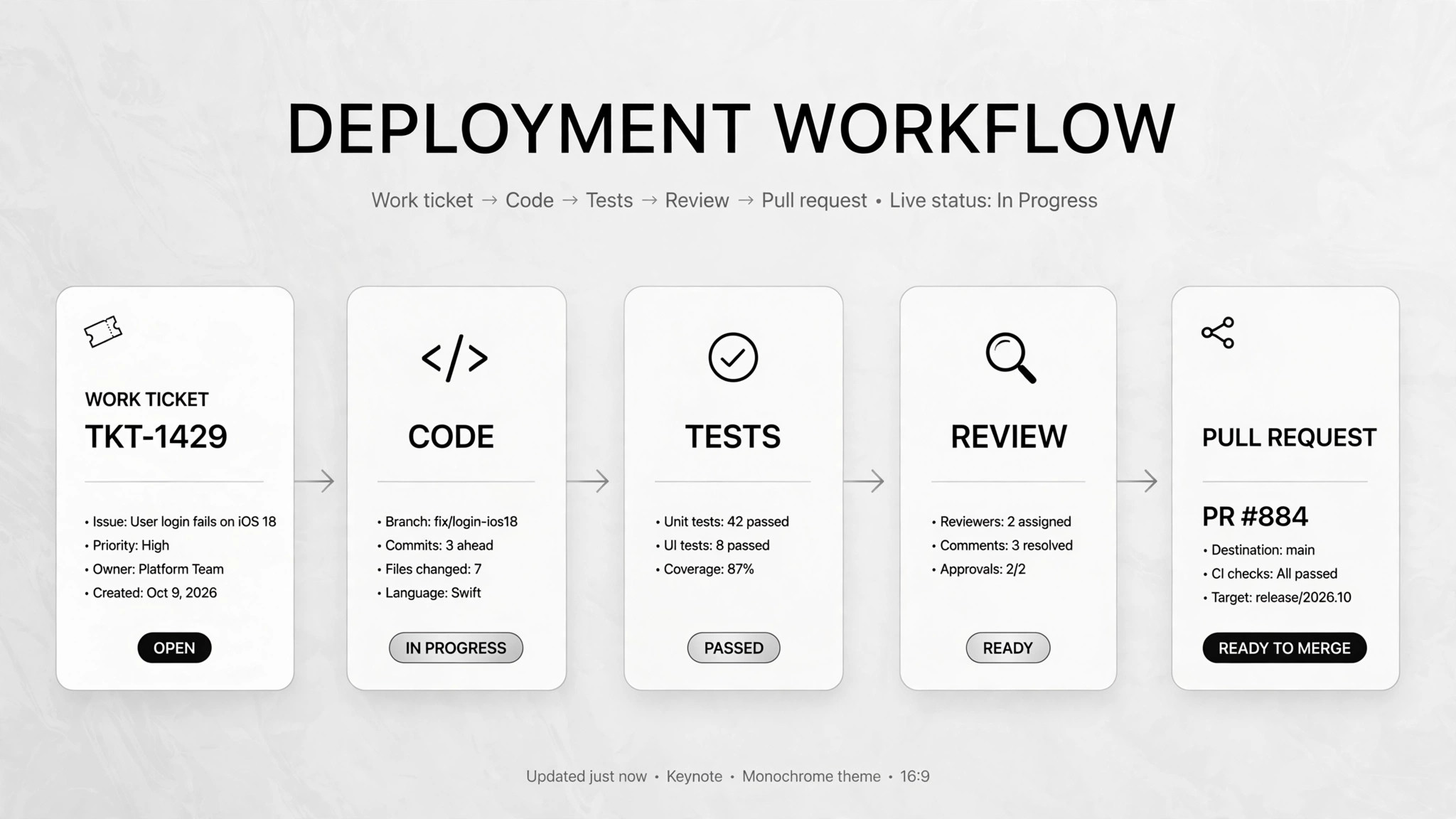
A work ticket in, a tested pull request out.
Turns work tickets into tested, draft-only pull requests — the agent codes, tests, and self-reviews; a human always merges.
Install it in 3 steps
No sign-up. No CLI tools. Pick your AI, copy one line, paste it over.
Prefer doing it yourself? Buy the skill ($4.99), download the ZIP from your checkout confirmation, unzip it into the directory shown above, restart your AI session — same result. Already bought it? Your AI assistant can download it for you.
Real-world proof
Real people did this exact job with AI agents.
Have Claude implement most of a day job's work
Read case →Use caseRun a multi-bot team that opens draft PRs
Read case →What’s inside
One SKILL.md (the playbook) + one starter template. A preview:
Ticket to PR
When to use
- You have a queue of well-defined tickets (bug fixes, small features) and not enough developer hours
- Routine development work eats most of your day and you want a pipeline: ticket → branch → code → draft PR
- Review comments keep bouncing back for the same classes of issues and you want an automated fix loop
- A team wants to try an AI coding pipeline without giving the agent merge rights
- You need consistent test and security checks on every change before human review
Workflow
- Pull and triage tickets (input: ticket tracker → output: actionable vs. unclear list)
Grab assigned tickets on a schedule and split them: clear enough to build, or needs clarification. Unclear tickets get a drafted reply for a human to send — the agent never starts coding on guesswork. - Classify risk and route (input: actionable ticket → output: risk level + build plan)
Read the ticket, map the relevant repo files and related history. Assign risk: low (fix in one module), medium (new behavior), high (auth, payments, migrations). High-risk work gets human direction before any code is written. - Implement the smallest change (input: ticket + context → output: working code on a new branch)
Write the minimal change that satisfies the ticket, on a fresh branch. No refactors, no extras, no "while I'm here" improvements. Small diffs get reviewed and merged; big ones rot. - Test and self-review (input: code → output: passing checks or bounce-back)
Run the test suite, lint, type checks, and build. Then review the diff independently — looking for regressions and missing tests, the way a teammate would. Failures bounce back to the implementer. Cap the loop (e.g. three rounds) so it can't spin forever on a design problem. - Security pass (input: passing code → output: security notes)
Scan for leaked secrets, auth issues, and dependency problems — the things tests can't see. Flag anything suspicious in the PR notes rather than fixing it silently. - Open a draft PR (input: reviewed code → output: draft PR)
Open a draft pull request only. Never merge, never push to the main branch. The PR summarizes what changed, what was tested, the security notes, and the open questions a human should double-check.
Output spec
- One draft PR per ticket: ticket link, risk level, change summary, test results, security notes, open questions for the reviewer
- Triage log: which tickets were built, which were drafted-as-questions and why
- Draft-only is the hard line: the agent never merges and never pushes to the main branch
- Companion template.md skeleton — fill in the blanks and use it
Good vs. bad examples
Template preview
Ticket to PR — Pipeline Run Template
One ticket = one run. Fill this in as the pipeline processes it.
Ticket intake — {TICKET-ID}
Title: {ticket title} Tracker link: {url} Pulled at: {date/time, or schedule slot}
Triage decision
[ ] Actionable — clear enough to build → proceeds below [ ] Unclear — needs clarification → draft question below, code nothing
If unclear — drafted reply (human sends): > {the specific question, e.g. "Is this the session-expiry timeout or the UI spinner hang? Steps to reproduce: …"}
Risk classification & routing
Risk: [ ] low (fix in one module) [ ] medium (new behavior) [ ] high (auth / payments / migrations)