Icon Distribution Sweep
A sweep of icons sorts itself into place — distribution you can watch happen.
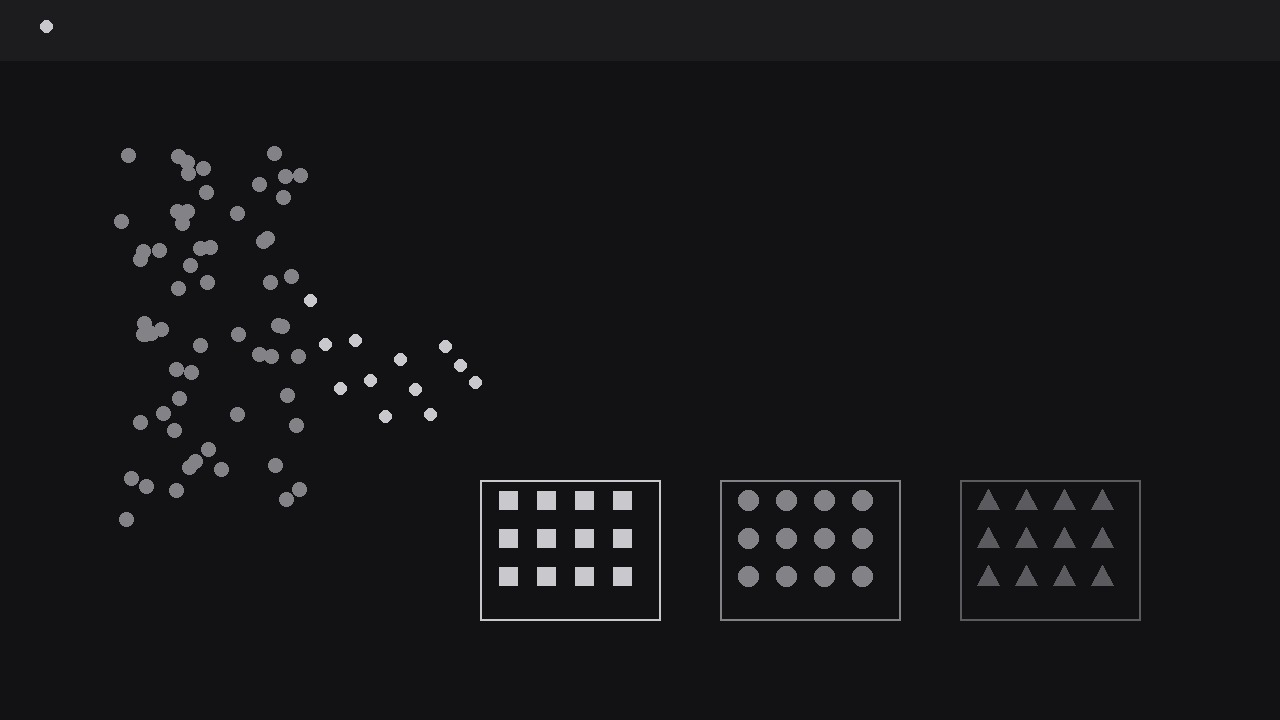
Turns your AI into a motion-graphics director for distribution sweeps — takes a cloud of icons, sweeps them across the frame, and sorts them visibly into their groups or bins so the audience watches a distribution happen instead of being told about it. For explainers about sorting, allocation, survey results, and any split that needs to be seen to be believed.
Install it in 3 steps
No sign-up. No CLI tools. Pick your AI, copy one line, paste it over.
Prefer doing it yourself? Buy the skill ($4.99), download the ZIP from your checkout confirmation, unzip it into the directory shown above, restart your AI session — same result. Already bought it? Your AI assistant can download it for you.
What’s inside
One SKILL.md (the playbook) + one starter template. A preview:
Icon Distribution Sweep
When to use
- A results video needs to show how a hundred survey responses, votes, or items split across a few categories — and the split itself is the story
- An onboarding or process explainer shows incoming items being sorted into teams, queues, or destinations
- A budget, inventory, or allocation video divides one pool into portions and the audience must feel the proportions, not just read percentages
- A classroom or training clip demonstrates a classification rule: every item gets judged and lands in exactly one bucket
- A social clip needs a satisfying sorting moment — a messy pile resolving into neat groups — as the hook before the explanation
Workflow
- Define the pile and the bins (input: items and categories → output: pile-and-bins map)
Start with two lists: the pile (what is being distributed) and the bins (where it lands). The pile must be countable things of one kind — responses, orders, tickets, files — each represented by one identical icon. The bins are two to five categories, each with a name of one or two words and a destination zone on screen. Cap the total icons at 100: at that count each icon is still individually visible, and the pile still reads as "many". Beyond 100, switch to icon-units (one icon = ten items) and say so on screen — pretending 1,000 icons are individually countable is dishonest and unreadable. For each bin, write its share as a count, not just a percentage ("42 of 100 go to Support"), because the animation will show counts, and the script must match the animation exactly. If an item could belong to two bins, fix the rule before animating: a distribution where items hesitate between bins reads as a broken sort. - Stage the pile and the bins (input: pile-and-bins map → output: staged frame)
Lay out the frame in two zones: the pile zone (a loose cloud or stack on one side, icons slightly overlapping, gently jittered so it reads as unsorted) and the bin zones (a row along the bottom, or a row of columns, each with a clear label and an empty receiving area). Bins get equal-sized zones regardless of their eventual share — sizing bins by outcome prejudges the result and makes small bins look like afterthoughts. Give each bin a distinct marker: a different icon shape, a different shade, or a small header glyph, so a colour-blind viewer can still tell the bins apart by form. The pile's icons all start in one shared style; they take on their bin's marker only when they land, which makes the sorting visible as a transformation, not just a relocation. Leave clear travel lanes between the pile and the bins — no labels, captions, or decorations crossing the sweep path.
Template preview
Icon Distribution Sweep — Starter Template
One pile, visible sorting, counts that match the source exactly.
What is being distributed (one sentence)
{Example: "100 survey responses split across four support teams."}
Pile
One icon kind: {e.g. identical dot / ticket glyph} | Total icons: {≤100, or 1 icon = {n} items} Source of counts: {where the numbers came from — the animation must match it}
Bins (2–5, equal-sized zones)
Total check: {sum of bin counts} = {pile total} ☐
Staging
- Pile zone: {one side, loose jittered cloud} | Bin zones: {row along bottom / column}
- Travel lanes: {clear of labels and decorations}


