AI SEO Auto Publisher
From keyword to published article — a supervised SEO pipeline
Run a supervised SEO content pipeline with your AI assistant: research keywords, draft articles, fact-check every claim, hold drafts in a human approval queue, then publish to your CMS. The assistant writes and checks; you approve what goes live. No auto-publishing, no ranking promises — just clean, original, verified articles.
Install it in 3 steps
No sign-up. No CLI tools. Pick your AI, copy one line, paste it over.
Prefer doing it yourself? Buy the skill ($4.99), download the ZIP from your checkout confirmation, unzip it into the directory shown above, restart your AI session — same result. Already bought it? Your AI assistant can download it for you.
What's inside
One SKILL.md (the playbook) + one starter template. A preview:
AI SEO Auto Publisher
The facts this skill runs on (verified 2026-11-02)
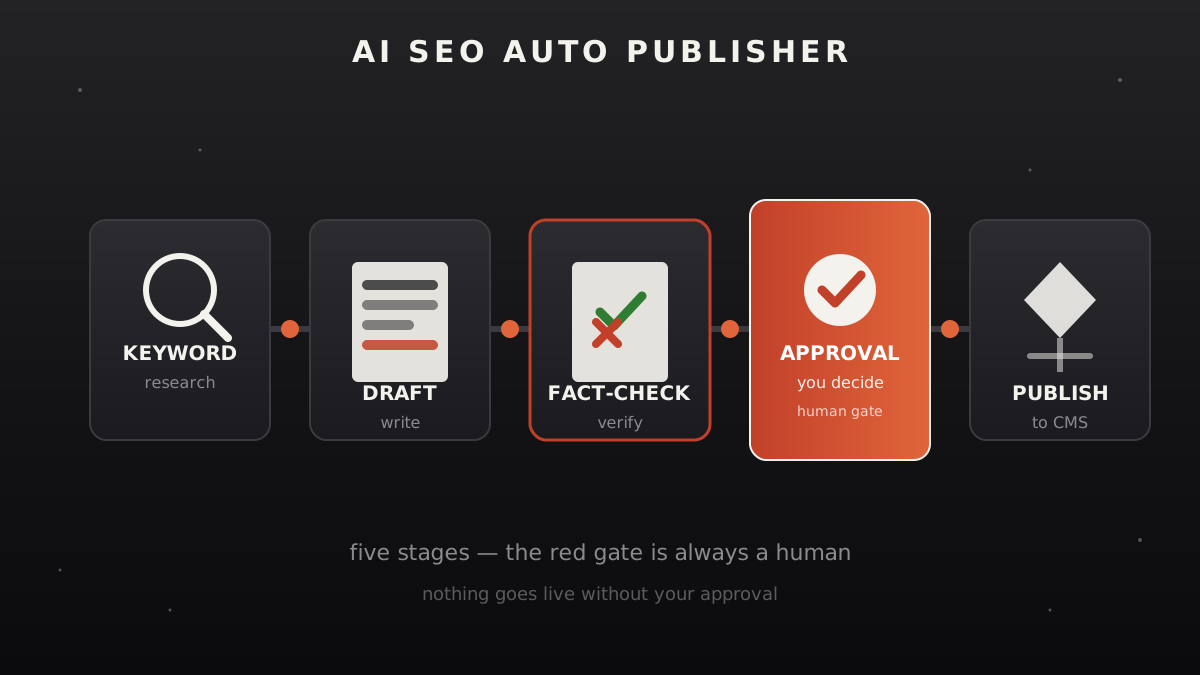
- The pipeline is five stages, and one of them is you. Keyword research → brief → draft → fact-check → approval queue → publish. The assistant can do the first four; the last gate before anything goes live is a human approval. "Auto" here means the busywork is automated, not that articles publish themselves unsupervised.
- Publishing needs real credentials you provide. Posting to WordPress (REST API + application password), Ghost (Admin API key), or any other CMS requires credentials you create in your own CMS admin. This skill never asks for them in chat — you paste them into your own config, and the skill shows you exactly where each CMS expects them.
- Fact-checking is verification against sources, not a guarantee. Every factual claim in a draft is checked against the sources the assistant actually opened. Claims that can't be sourced are cut or flagged — never smoothed over. AI-generated text can still be wrong; the approval queue exists for exactly this reason.
- No ranking promises. This skill produces clean, well-structured, original articles. It does not promise Google rankings, indexing speed, or AI-answer citations. Anyone who promises those is selling something this skill doesn't.
When to use
- You want a steady stream of SEO articles without writing each one from scratch — the assistant drafts, you approve.
- Your CMS sits empty because publishing is a chore: the skill turns "publish this draft" into one confirmed step.
- You need every article checked before it goes out — the fact-check pass runs before the approval queue, not after.
- You're building topical authority in a niche and need consistent, original, structured content.
Safety rules (non-negotiable)
- Nothing publishes without your explicit approval. The approval queue is not a formality. Each article shows you: the draft, the sources it cites, and every claim the fact-check flagged. You say go, or it doesn't go.
- No plagiarism, no spinning. Every article is written fresh. If the research turns up a source the draft leans on too heavily, the skill rewrites or cuts — it never paraphrases one article into a "new" one.
- No deceptive SEO. No keyword stuffing, no hidden text, no fake author bylines, no fabricated reviews or statistics, no doorway pages. If a tactic would embarrass you when Google looks closely, it's out.
- Your credentials stay yours. CMS API keys and passwords go into your own config files or environment, never into chat, never into a shared doc.
Workflow
- Keyword research (input: niche + seed topics → output: keyword brief)
You give the niche and a few seed topics. The assistant researches real search demand — what people actually ask about — and returns a brief per keyword: the target query, the search intent behind it (informational / comparison / how-to), what the top-ranking pages cover, and the angle your article will take to earn its place. One keyword per article; no multi-keyword stuffing. - Outline and brief (input: keyword brief → output: article outline)
The assistant turns the brief into an outline: H1, H2s, the question each section answers, and the facts each section will need with their intended sources. You can adjust the angle here — it's cheaper than rewriting a full draft. - Draft (input: outline → output: full draft)
The assistant writes the complete article: original prose, clear structure, no filler. Every factual claim is written with its source noted inline (to be formalized in step 4). Target length follows the intent — a definition post doesn't need 3,000 words, a comparison does. - Fact-check pass (input: draft → output: checked draft + flag list)
The assistant re-reads the draft claim by claim. For each factual statement: is there an opened source that supports it? Verdicts per claim: verified (source cited), softened (reworded to what the source actually supports), or cut (no source found). The flag list shows you every softened and cut claim — nothing is silently dropped. - Approval queue (input: checked draft + flags → output: your decision)
You see the draft, its sources, and the flag list. Three options per article: approve (goes to the publish queue), revise (back to step 3 with your notes), or reject (dropped, logged with the reason). The queue is a simple list — newest drafts on top, nothing auto-expires. - Publish (input: approved draft → output: live URL + publish log)
Only approved drafts reach this step. The assistant formats the article for your CMS (title, slug, meta description, headers, images with alt text) and publishes via the CMS API using your credentials, or prepares a one-click import file if you'd rather push the button yourself. The publish log records: article, date, URL, and the CMS response.
Template preview
AI SEO Auto Publisher — Job Report
One report per article. Fill every field — "n/a" is an answer, a blank is not.
Keyword brief
- Target query:
- Search intent (informational / comparison / how-to):
- Top-ranking pages cover:
- Our angle:
Outline approved
- H1:
- H2s:
- Date approved:
Draft
- Word count:
- Draft file:
Fact-check
Approval
- [ ] Approved — publish
- [ ] Revise — notes:
- [ ] Rejected — reason:
- Decided by / date:
Publish log
- CMS:
- URL:
- Published at:
- Meta title / description set:
FAQ
What is AI SEO auto publishing?
AI SEO auto publishing means running the whole article pipeline — keyword research, drafting, fact-checking, approval, and CMS publishing — with an AI assistant doing the heavy lifting. This skill structures it as five supervised stages, so the busywork is automated but nothing goes live without your approval.
Does it publish articles automatically without review?
No — and that's the point. Every draft sits in an approval queue showing you the article, its sources, and every claim the fact-check flagged as softened or cut. You approve, revise, or reject each one. Auto-publish without review is exactly what this skill refuses to do.
Which CMS platforms can it publish to?
Any CMS with an API — the skill documents the WordPress REST API and Ghost Admin API flows, and the pattern generalizes. You create the API credentials in your own CMS admin and keep them in your own config; the skill never asks for passwords in chat.