AI Services Market › スキルファクトリー › その他 › Matter/Thread Rollout Planner
$4.99 · サインイン不要v1.0.0– 回表示
Matter/Thread Rollout Planner
初回で動くMatter/Threadの展開を。
中央ハブを中心にスマートホーム移行を計画します。カバレッジのマッピング、Thread Border Routerの配置、無線別のデバイス棚卸し、部屋ごとの展開順序、ネイティブに再構築されたオートメーションを扱います。
こんな方におすすめ
Matter/Threadへアップグレードするスマートホーム所有者
所要時間
計画に約1時間
レベル
中級
3ステップでインストール
登録不要。CLIツールも不要です。お使いのAIを選んで、1行コピーして貼るだけです。
ご自分で入れたい場合は、スキルを購入($4.99)し、購入完了画面からZIPをダウンロードして、上のディレクトリに展開し、AIのセッションを再起動してください。結果は同じです。すでに購入済みの場合は、AIアシスタントにダウンロードしてもらうこともできます。
パックの内容
SKILL.md(手順書)1点とスターターテンプレート1点が入っています。プレビューはこちらです:
Matter/Thread Rollout Planner
When to use
- You bought (or plan to buy) a smart-home hub with Matter and Thread and want the rollout to work the first time.
- Your current setup is a mess of Wi-Fi devices, old Zigbee gear, and three competing apps.
- You're deciding which existing devices survive the migration and which get replaced.
- You're an installer scoping a job and need a coverage plan you can defend.
Workflow
- Draw the house (input: floor plan or room list → output: coverage map)
Sketch every floor with room names and approximate distances. Mark: where the hub will live, where Wi-Fi is already weak (dead zones become Thread dead zones too if you don't plan), and physical barriers (brick, concrete, metal doors, mirrors) that eat 2.4 GHz signal. Thread runs on 2.4 GHz mesh — walls matter more than marketing suggests. - Place the border routers (input: coverage map → output: router placement)
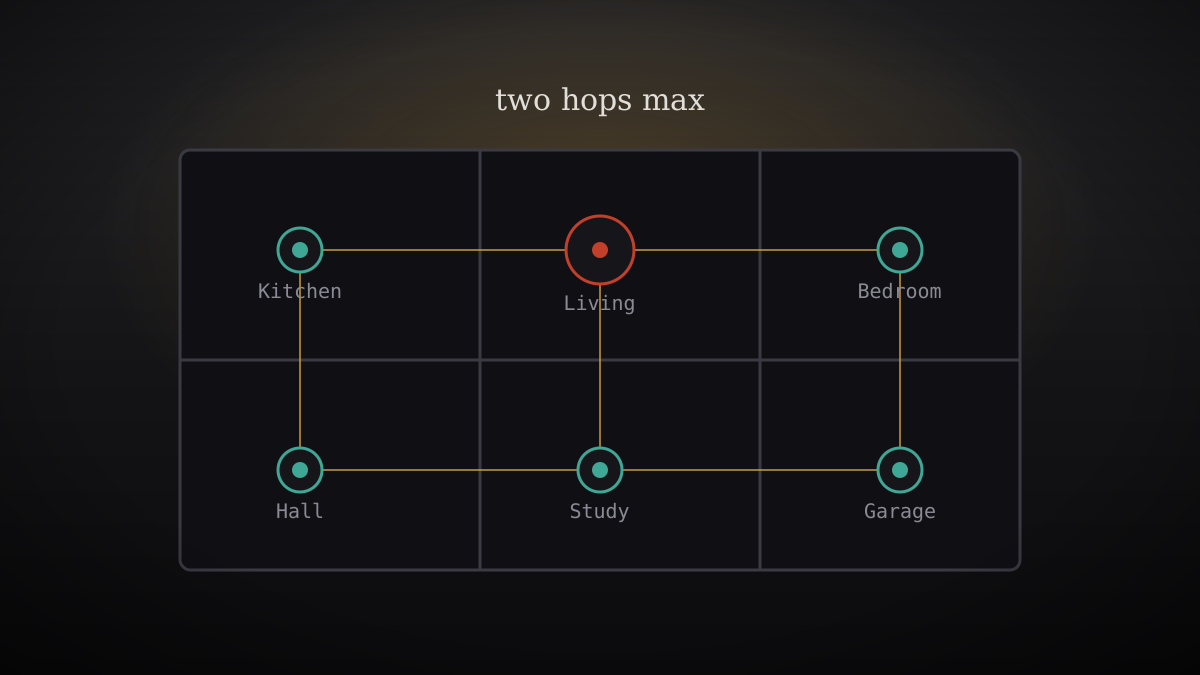
A Thread Border Router bridges Thread to your Wi-Fi/LAN. Rule of thumb: one border router per floor for a typical home, no device more than two hops from a router, and routers placed centrally — not in a closet, not behind the TV. If your hub is the only border router and it lives in the living room, the far bedroom's Thread lock is a gamble: add a second router (many smart speakers and TVs now include one) or move the hub. - Inventory by radio (input: device list → output: migration table)
List every smart device and tag its radio: Matter-over-Thread, Matter-over-Wi-Fi, Zigbee (needs its own bridge or replacement), Z-Wave (same), Wi-Fi-proprietary (check for Matter firmware updates — several vendors shipped them), Bluetooth-only (range-limited, hub won't fix it). For each non-Matter device decide: keep via bridge, update firmware, or replace — with a cost per row. - Sequence the migration (input: migration table → output: rollout order)
Order: (a) hub + border routers first, verify the mesh; (b) mains-powered Thread devices next (they become routers and strengthen the mesh — battery devices can't); (c) battery devices and locks; (d) automations and scenes last, rebuilt natively rather than imported. Never migrate everything Saturday morning — one room per evening, with a rollback note per room (what the old setup was). - Rebuild automations natively (input: old automations → output: new automation list)
Don't port old routines 1:1 — re-express each in the hub's model: triggers (sensor, time, presence, alarm-sound recognition), conditions (who's home, which recognition tier), actions (device states, announcements). Kill every automation you can't explain in one sentence; each surviving one gets a name, a trigger, and a "what if the internet dies" answer (local-first automations keep working — cloud ones don't). - Document and harden (input: finished rollout → output: home network doc)
Write the one-page doc: hub location and admin account, border router list, device inventory with radios, the Wi-Fi network IoT devices use (separate IoT SSID or VLAN if you can), and the recovery procedure (hub factory reset → what must be re-paired). Store it where the next person to touch the system will find it.
テンプレートのプレビュー
Matter/Thread Rollout Worksheet
Plan with your AI before buying a single device.
1. Coverage map
Rooms per floor, distances, barriers (brick/concrete/metal/mirrors), Wi-Fi dead zones, planned hub location:
2. Border router placement
Two-hop check: is any Thread device more than 2 hops from a router? Fix now.
3. Device inventory by radio
4. Rollout order
- Hub + border routers → verify mesh:
- Mains-powered Thread devices (mesh backbone):
- Battery devices & locks:
- Automations rebuilt natively:
- Old bridge decommissioned (after 1 clean week):
Rollback note per room:
5. Automations (rebuilt, not ported)
スキルパック本体(SKILL.md とテンプレート)は英語で書かれています。


