Scheduled Agent Routine Rescue
Find which scheduled routine is eating your usage budget — and stop it
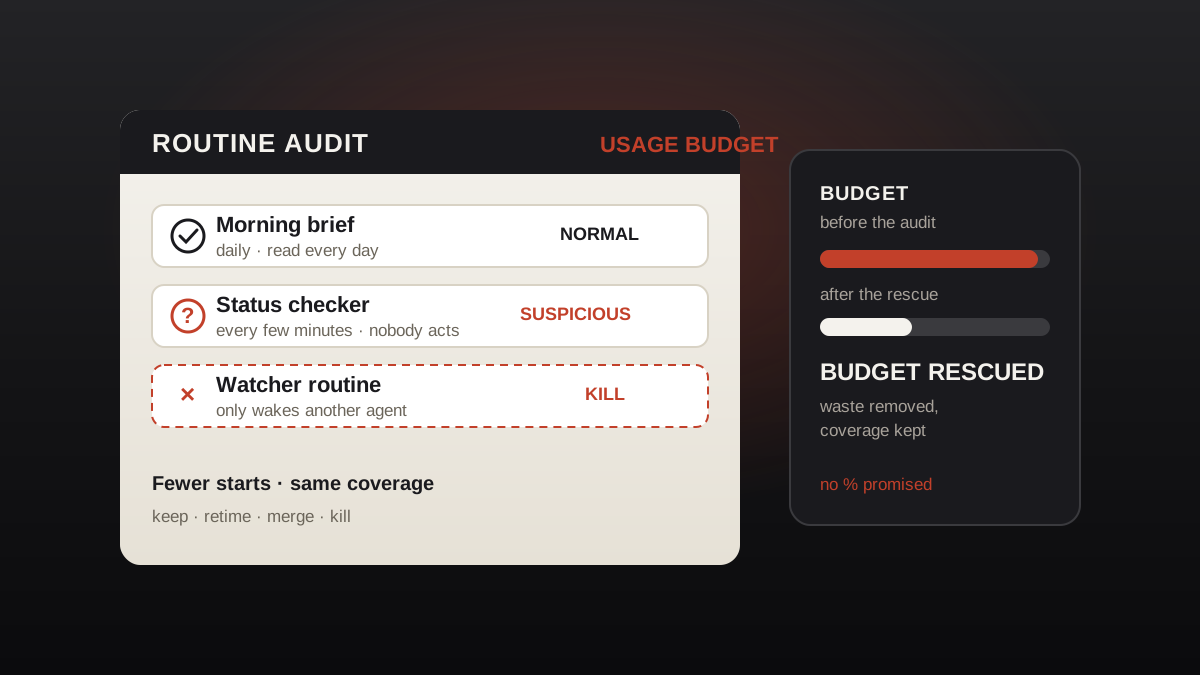
Audit a fleet of scheduled AI agents that keeps burning through its usage budget: list every agent and scheduled routine, diagnose the failure mode — zombie routines, wake-up loops, context accumulation, high-frequency polling, or a plan change that moved the baseline — then kill, merge, or retime the waste, set a spend ceiling, and hold it with a weekly reconciliation. No savings percentage promised.
In 3 Schritten installieren
Keine Anmeldung. Keine CLI-Tools. Wählen Sie Ihre AI, kopieren Sie eine Zeile und fügen Sie sie ein.
Lieber selbst machen? Kaufen Sie den Skill ($4.99), laden Sie die ZIP-Datei aus Ihrer Kaufbestätigung herunter, entpacken Sie sie in das oben angezeigte Verzeichnis und starten Sie Ihre AI-Sitzung neu — gleiches Ergebnis. Haben Sie ihn schon gekauft? Ihr AI-Assistent kann ihn für Sie herunterladen.
Was ist enthalten
Eine SKILL.md (die Anleitung) + eine Startvorlage. Eine Vorschau:
Scheduled Agent Routine Rescue
A vendor-neutral audit for any platform that runs scheduled agents against a usage budget. The method is the same whatever platform you run; wherever a step needs a platform control, use your platform's corresponding control. This skill names no vendor's buttons, pricing, or limits — if a control does not exist on your platform, use the closest equivalent and note the gap in the audit table instead of inventing one.
What this skill will not do (read first)
- It does not change what your vendor charges, what a plan includes, or how usage is measured. Pricing and budget sizes are the vendor's; this skill only changes what your agents do with the budget.
- It does not promise a savings percentage and does not promise the budget will be enough afterwards. If your real workload genuinely needs more than the budget, the honest outcome of this skill is proof of that — not a miracle.
- It does not touch agents, routines, or accounts you do not own or are not authorized to change. If ownership is unclear, stop and ask.
- It never works around a budget by switching keys, projects, or accounts. That is not saving; that is hiding the burn.
The patterns this skill checks for
These are generic failure patterns of scheduled-agent fleets. Treat each as something to check in your own fleet, not as a fact about any particular platform:
- Scheduled routines that used to fit the budget start eating it faster, sometimes right after a plan or pricing change, with no new routines added.
- An agent that misses its scheduled runs tempts its owner to add a second routine whose only job is keeping it awake. That watcher routine itself consumes budget — the cure becomes part of the disease.
- A single long session grows steadily more expensive per reply, on platforms where each reply re-reads the session's history. The session's own history becomes its biggest cost line.
- A routine that checks something every few minutes, around the clock, burns budget far faster than the job requires — including hours when nobody acts on the result.
- Wake-ups are the real cost driver for many fleets: every scheduled job that starts an agent costs budget the moment it starts, even if it immediately finds nothing to do.
- Usage reporting itself can mislead: a dashboard, API view, or agent-side report can disagree with the billing view. Trust the billing view over any single secondary view.
When to use
Vorschau der Startvorlage
Scheduled Agent Routine Rescue — Templates
Copy these tables and fill them in. "Unknown" is an answer; a blank is not. Keep the filled tables with the fleet's records — the next audit starts from them, not from scratch. Where a field needs a platform control, use your platform's corresponding control.
Table A — Routine Audit Table
One row per agent, one row per scheduled routine. Complete it before killing anything.
Tag rules:
- Normal — produces something somebody uses, at a cadence the job needs.
- Suspicious — output nobody reads, starts only to find nothing to do, or runs far more often than its job requires.
Das Skill-Paket selbst (SKILL.md + Vorlage) ist auf Englisch verfasst.
Das könnte Ihnen auch gefallen
 Workflows
Grok Bot Routine Rescue
Find which scheduled routine is eating your weekly pool — and kill it
 Workflows
Inbox Triage
Ihr Postfach, vorsortiert: Dringendes markiert, Antworten entworfen, Sie klicken nur noch auf Senden
 Workflows
Bill Fighter
Fechten Sie Überpreise und abgelehnte Ansprüche mit beleggestützten Schreiben an