Tax Filer
税務書類を入れれば、確認用ドラフト申告書が出てきます——申告はあなたが行います
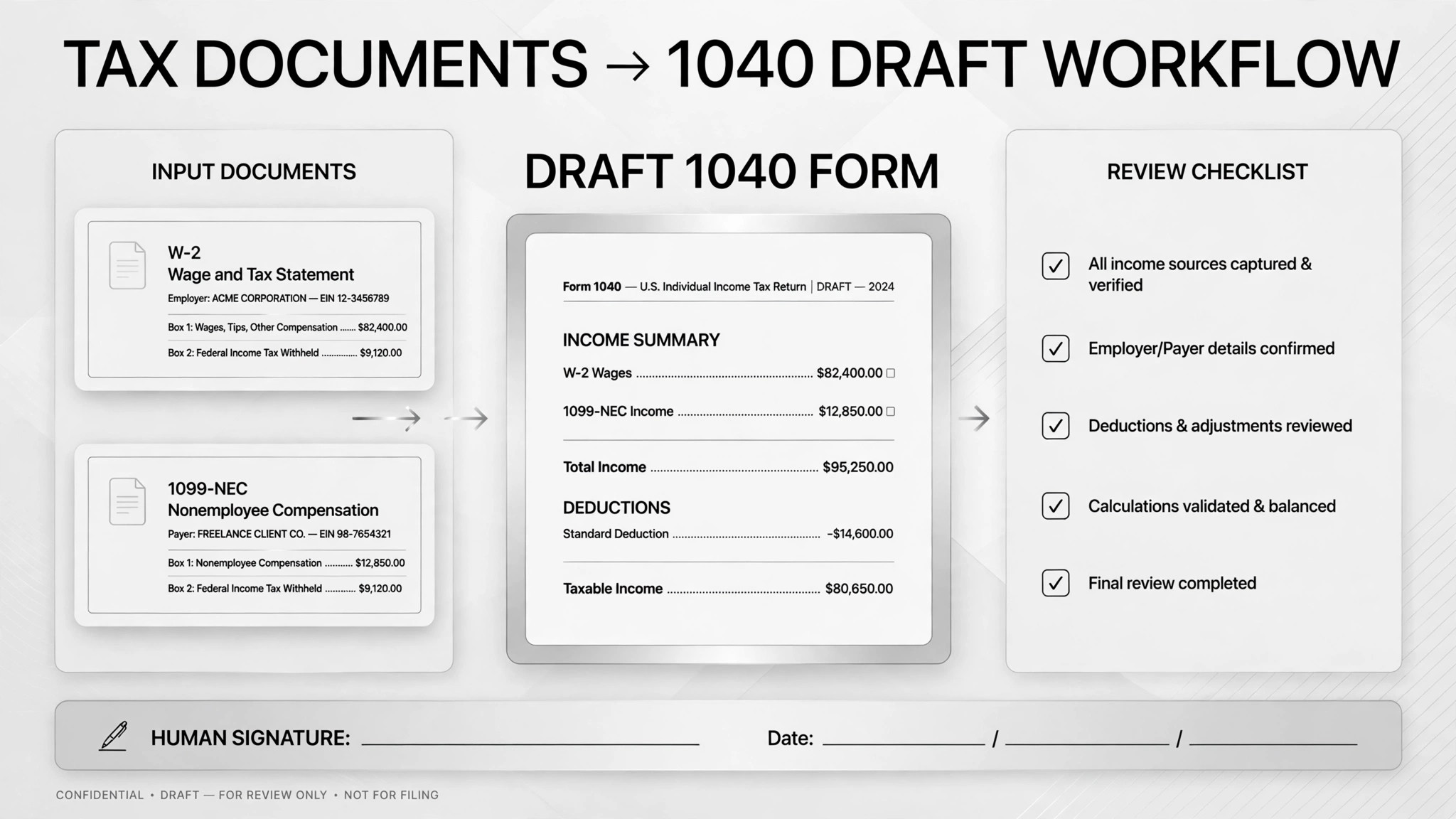
税務書類の山を、確認用ドラフト申告書に変換します。W-2、1099、請求書を仕分けし、すべての数値を抽出、あいまいなものにフラグを立て、様式を下書きします。申告するのはAIではなく、あなたです。
3ステップでインストール
登録不要。CLIツールも不要です。お使いのAIを選んで、1行コピーして貼るだけです。
ご自分で入れたい場合は、スキルを購入($4.99)し、購入完了画面からZIPをダウンロードして、上のディレクトリに展開し、AIのセッションを再起動してください。結果は同じです。すでに購入済みの場合は、AIアシスタントにダウンロードしてもらうこともできます。
実際の活用事例
実際のユーザーがAIエージェントで、まさにこの仕事をやり遂げた事例です。
Sort tax documents and fill IRS forms
事例を読む →活用事例Compile deductions and Schedule C with Claude Code
事例を読む →活用事例Do taxes by selecting the right invoices
事例を読む →パックの内容
SKILL.md(手順書)1点とスターターテンプレート1点が入っています。プレビューはこちらです:
Tax Filer
When to use
- Tax season arrives and you have a folder full of W-2s, 1099s, and brokerage statements that need sorting before anything can be filed
- You are a freelancer or sole proprietor who needs a clean Schedule C draft built from a year's worth of invoices and receipts
- Your receipts and donation records live scattered across Gmail, folders, and bank statements, and you need them consolidated into deductible line items
- You want a second pass over your numbers — e.g. running a draft through TurboTax or a second checklist — before you submit
- You do quarterly books and want invoices read, matched to companies and dates, and mapped to the right accounting categories without hand-entry
Workflow
- Gather the raw material (input: your emails, folders, statements → output: complete document list)
Pull everything into one place: tax forms, invoices, receipts, donation confirmations, brokerage statements. A former tax pro in one real case dumped all forms and blank return forms into a single folder and let the AI inventory it first — chasing documents after the fact is where errors hide. - Classify every document (input: document list → output: labeled document set)
Tag each item by type: W-2, 1099, invoice, deduction, brokerage statement, donation receipt. In the invoice case, the AI also matched each invoice to its company and date so nothing was filed twice or missed. - Extract figures and track what's missing (input: labeled documents → output: figures table + missing-items list)
Write every key number into a checkable plain-text or spreadsheet table — name, amount, document, line it belongs on. Keep a parallel list of what's missing (e.g. "charity receipt for Q3 not found"). One real case had the AI build a Gmail search for tax attachments that downloaded receipts, extracted the numbers, and tracked exactly which materials were still absent. - Draft the return or schedule forms (input: figures table → output: completed draft forms)
Fill the 1040, Schedule C, or your deduction summary using the extracted figures — as a draft, in a reviewable format. The AI prepares; it does not submit. A freelancer's quarterly case stopped at "generate the review table, never auto-file." - Flag the ambiguous and cross-check (input: draft forms → output: flagged items + verification result)
Ambiguous items — medical vs. childcare expenses, unclear deduction categories, fuzzy figures — go on a separate list for human decision. Then run a cross-check: one real case ran the AI's completed 1040 draft through TurboTax independently to catch disagreements between the two. - You review and file (input: draft + flags → output: filed return)
You verify every extracted figure, decide every ambiguous item, and do the actual filing yourself (or in your filing software). This is the non-negotiable step: tax liability can't be outsourced.
テンプレートのプレビュー
Tax Filer — Draft Return Checklist
One tax year = one checklist. Fill this in before the AI drafts anything.
Year & scope
Tax year: {YYYY} Filing type: {individual / sole proprietor / other} Forms needed: {1040 / Schedule C / Schedule A / state forms — list}
Document inventory
Missing documents (track here until found or dropped):
- {description} — expected from {source} — [ ] found / [ ] unavailable
Figures table (one row per figure)
Review checklist before drafting: [ ] Every row links to a collected document [ ] Amounts are exact, not rounded [ ] Missing items are on the missing list, not guessed
Ambiguous items (AI flags, human decides)
スキルパック本体(SKILL.md とテンプレート)は英語で書かれています。


