AI Services Market › スキルファクトリー › 動画 › Synchronized Action Checklist
$4.99 · サインイン不要v1.0.0– 回表示
Synchronized Action Checklist
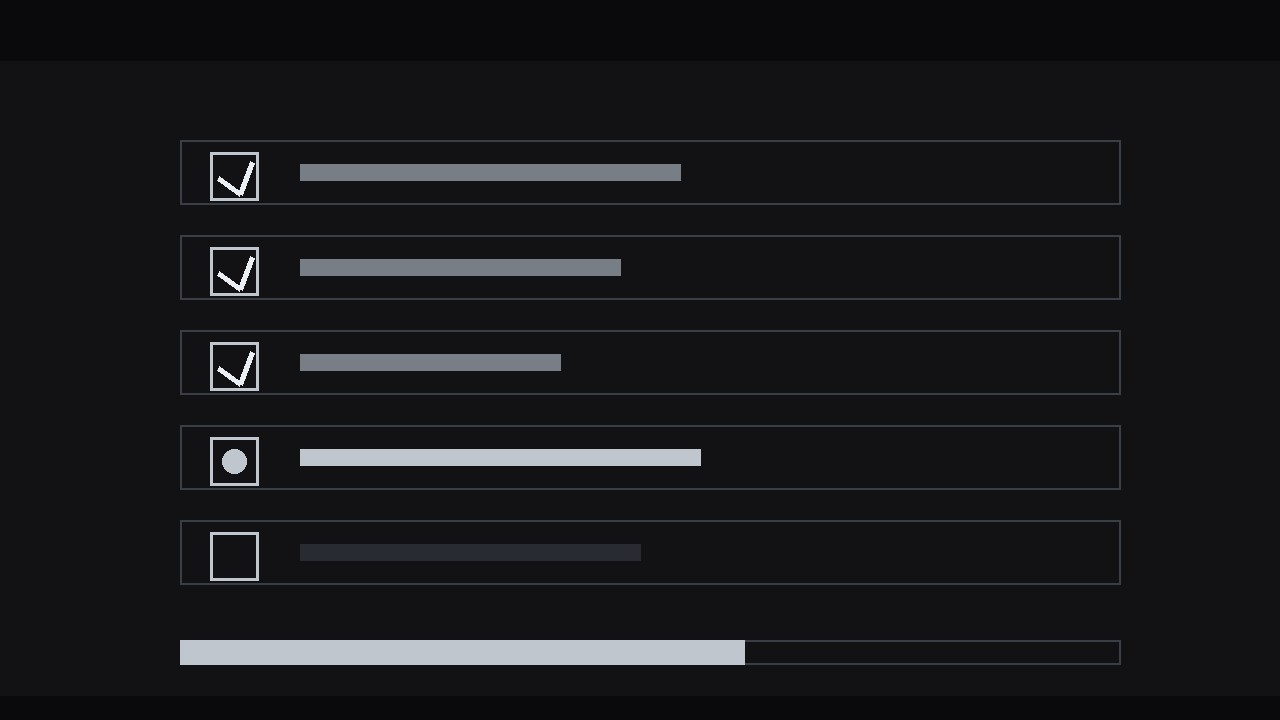
アクションの進行に合わせて自らチェックが入るチェックリスト。
各ステップが目に見えて完了する正確なフレームでチェックが入るチェックリストパネルを構築します。待機中、スキップ、失敗の状態も備えているので、視聴者はチュートリアルやデモの現在地が常に分かります。
こんな方におすすめ
チュートリアル制作者、トレーナー、デモのプレゼンター
所要時間
30分
レベル
初心者向け
3ステップでインストール
登録不要。CLIツールも不要です。お使いのAIを選んで、1行コピーして貼るだけです。
ご自分で入れたい場合は、スキルを購入($4.99)し、購入完了画面からZIPをダウンロードして、上のディレクトリに展開し、AIのセッションを再起動してください。結果は同じです。すでに購入済みの場合は、AIアシスタントにダウンロードしてもらうこともできます。
パックの内容
SKILL.md(手順書)1点とスターターテンプレート1点が入っています。プレビューはこちらです:
Synchronized Action Checklist
When to use
- A tutorial or screen recording where the audience must track which steps are done and what comes next
- A process explainer — onboarding, setup, assembly, a recipe — where the steps have a visible real-world action each
- A demo video where the presenter completes actions live and the checklist is the scoreboard
- A training video where missing a step has consequences, and the tick is the confirmation the step is really complete
- A "follow along" video where viewers pause and catch up, and the checklist tells them exactly where they are
Workflow
- List the real actions (input: process or script → output: 3–8 checklist items, each tied to one visible action)
Write down the steps as the audience will perform them, not as the manual describes them. Each item must correspond to one action the camera can actually show: "Plug in the cable" qualifies; "Ensure connectivity" does not — nobody can see "ensuring." Cap the list at 8 items; beyond that, split the sequence into two checklists (Part 1 / Part 2) rather than shrinking the type. Phrase each item as a verb-first command under 6 words: "Connect the power cable," "Enter the setup code." If an item needs more than 6 words to be clear, it is two steps — split it. - Design the checklist panel (input: item list → output: static checklist layout with unchecked boxes)
Place the checklist in a consistent panel — left third or right third of frame, or a lower-third strip for full-screen action. Each row: an empty checkbox (rounded square, 2 px stroke), the item text, and a subtle row divider. All items start unchecked and at equal visual weight; the current item gets a highlight (a brighter row background or an accent-coloured checkbox outline) so the eye knows where to look. Reserve space for the checkmark inside every box from the start — if the box changes size when checked, the whole list jitters. Font size must survive a phone screen: test at 360 px wide before animating anything. - Map each tick to its action (input: footage + checklist → output: tick timing sheet with one timecode per item)
Scrub the footage and mark the exact frame where each action visibly completes — the cable clicks in, the code is accepted, the button turns green. That frame is the tick frame. The tick must never land on the moment the action starts; a checkmark that appears while the action is still underway teaches the audience to distrust every tick that follows. If the footage has no crisp completion moment for a step, insert one: a 4–6 frame close-up of the finished state (the seated connector, the confirmation screen) and tick on that. Write the timing sheet down — item, tick timecode, completion cue — before touching keyframes. - Animate the ticks (input: timing sheet → output: animated checklist with synced checkmarks)
Each tick is a three-part move on its tick frame. First, the checkmark draws on: a 6–8 frame stroke draw (the check path reveals left-to-right, ease-out) inside the box, accompanied by a soft 4-frame scale pop on the box itself (100% → 108% → 100%). Second, the completed row settles: the item text shifts to its done state — 60% opacity, or a thin strikethrough that draws on over 6 frames — while the next item's highlight slides down to its row over 8–10 frames. Third, optional progress feedback: a slim progress bar above or below the list fills by one segment (1/N of its length) over the same 8–10 frames, with a quiet tick sound or a 1-frame accent flash if your format uses audio cues. Never animate two ticks at once; the audience must be able to count completions one by one. - Handle waiting, skipping, and failure (input: animated checklist → output: states for pause, skip, and failed steps)
Real processes are not clean. If the action stalls (a download, a wait), show a waiting state on the current row: the checkbox becomes a pulsing dot or a three-dot ellipsis, and the row label stays at full weight — never tick a step that is still in progress. If a step is genuinely skipped, mark it distinctly: a dash or "skipped" label in a muted tone, not a checkmark and not silence — silence makes the audience wonder whether the video glitched. If a step fails and is retried, show the retry honestly: the checkbox flashes its error state (a brief accent-coloured X or shake of 2–3 frames, ±2 px) and returns to unchecked; the tick only lands when the retry succeeds. These states are what make the checklist feel like a truthful instrument rather than decoration. - Review against the footage and export (input: animated checklist → output: final render with verified sync)
Watch the full sequence at real speed with the sound on, and check every tick against its action: the checkmark must never precede the completion cue, and the gap between completion and tick must be under 6 frames — longer feels laggy, shorter (negative) feels fake. Check the phone-size test again on the final render: rows legible, checkmarks visible, progress bar readable. Export the main cut, plus a clean version with the checklist panel on its own transparent or solid background if the editor may need to reposition it.
テンプレートのプレビュー
Synchronized Action Checklist — Build Template
Fill this in before animating. One checklist per sequence, 3–8 items.
The process
Process name: {name} Video type: {tutorial / screen recording / demo / training / follow-along} Footage: {link or filename}
Checklist items (verb-first, ≤6 words each)
Panel design
- Position: {left third / right third / lower-third strip}
- Checkbox: {rounded square, 2 px stroke, size in px}
- Current-item highlight: {row background / accent checkbox outline}
- Done state: {60% opacity / strikethrough over 6 frames}
- Progress bar: {above / below / none}
- Phone test (360 px wide): [ ] rows legible [ ] checkmarks visible
スキルパック本体(SKILL.md とテンプレート)は英語で書かれています。


