AI Services Market › スキルファクトリー › 動画 › Mobile Step Pointer
$4.99 · サインイン不要v1.0.0– 回表示
Mobile Step Pointer
ポインターがすべてのタップを順番に案内します。
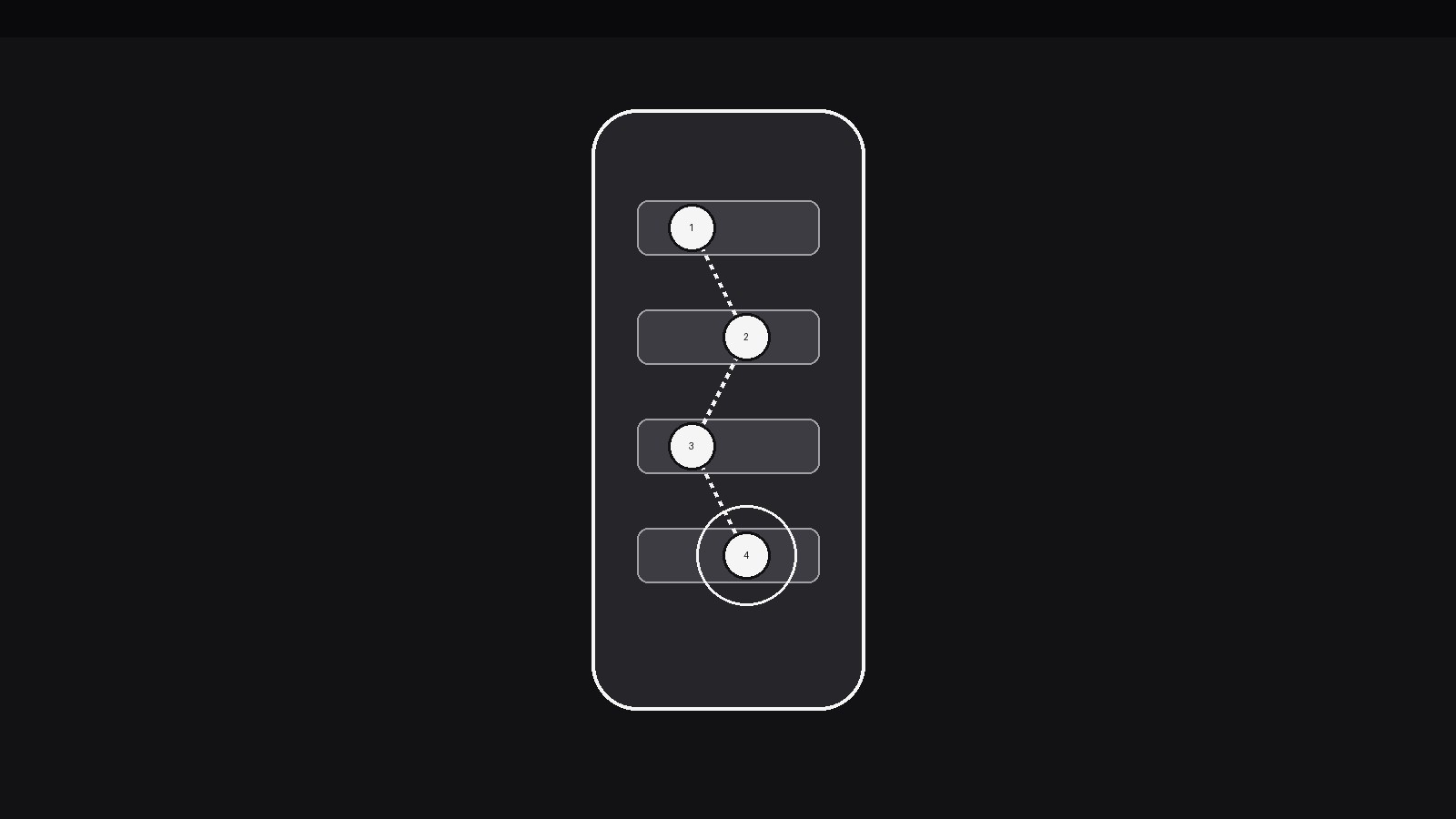
AIがひとつのパターンに特化したモーションデザイナーになります——ポインターがモバイル画面を滑らかに移動し、フローの各ステップを順番にタップしてハイライトするので、視聴者はマニュアルを読まずにアプリの操作を追えます。次のタップを明確に示したいアプリチュートリアル、オンボーディング解説、機能デモに最適です。
こんな方におすすめ
アプリチュートリアル制作者、オンボーディング動画制作者、機能デモのプレゼンター
所要時間
25分
レベル
初級
3ステップでインストール
登録不要。CLIツールも不要です。お使いのAIを選んで、1行コピーして貼るだけです。
ご自分で入れたい場合は、スキルを購入($4.99)し、購入完了画面からZIPをダウンロードして、上のディレクトリに展開し、AIのセッションを再起動してください。結果は同じです。すでに購入済みの場合は、AIアシスタントにダウンロードしてもらうこともできます。
パックの内容
SKILL.md(手順書)1点とスターターテンプレート1点が入っています。プレビューはこちらです:
Mobile Step Pointer
When to use
- An app tutorial must show a multi-tap task (set up an account, book a ride, file an expense) and the viewer needs to see exactly where each tap lands
- An onboarding walkthrough introduces a new screen and has to guide the eye through its controls in the order a new user would use them
- A feature demo shows a flow that is easy to miss in a static screenshot — the pointer makes the path through the screen visible
- A support or help video answers "where do I tap?" for one specific task, with no voiceover required
- A product marketing clip wants to show an app's key flow in 10–15 seconds, with the pointer doing the narrating
- A usability walkthrough needs to show the intended path through a screen, step by numbered step, so the viewer can compare it with what they would have done
Workflow
- Script the tap sequence (input: the task → output: step list)
Write the task as a numbered list of taps, each one naming the exact control ("Tap the + button, bottom right") — 3–6 steps per screen. One step = one tap = one pointer move; if a step needs two taps, it is two steps. Cap the sequence at 6 steps per screen; beyond that, split across screens with a clean transition between them. Read the list aloud as a user would do it: if any step makes you say "then you have to…", you have missed a step. The pointer can only teach a sequence the script has fully spelled out. - Frame the phone (input: step list → output: phone frame)
Show the phone at a size where every tappable control in the sequence is legible — on a 16:9 frame, the phone typically occupies 45–60% of frame height, centred or slightly off-centre with room for step labels on the side. Use a real screenshot or a faithful mock of the app's screen, never a generic wireframe: the viewer must be able to match what they see to their own phone. Keep the screen static during the pointer's travel — the phone frame does not wobble, tilt, or parallax while the pointer moves, because a moving target teaches nothing. - Choreograph the pointer (input: phone frame → output: pointer path)
The pointer is a single cursor — a fingertip dot, a ring, or a small arrow — that moves along a smooth path between tap targets. Between taps it travels 350–500ms with an ease-in-out curve, following a gentle arc rather than a straight laser line (a slight arc reads as a hand; a straight line reads as a machine). On arrival it pauses 150–200ms, then performs the tap: a 120ms press (pointer scales to 0.85, a ripple ring expands once, 200ms, fading), and the screen responds — the button depresses, the toggle flips, the next screen begins to arrive. The pointer never teleports: every move is a visible glide, so the viewer can trace the path. A small step number badge (1, 2, 3…) rides beside the pointer or appears at each target as it is tapped. - Show each step's result (input: pointer path → output: screen responses)
After each tap, the screen must visibly respond before the pointer moves on: the tapped control shows its pressed state, then the next screen (or the changed state of the same screen) arrives with a 300–400ms slide or fade. Hold the result for at least 600ms so the viewer registers cause and effect — tap → response — before the pointer glides to the next target. If a step's result is a new screen, let the pointer ride with the transition (it stays on its target through the slide) rather than vanishing and reappearing. Never let the pointer tap a control that doesn't respond; an unanswered tap teaches the viewer the app is broken. - Label the steps (input: screen responses → output: labelled sequence)
Each step gets a short label (≤6 words: "Tap + to add a trip") that appears in a consistent position — a caption bar below the phone or a small tag beside the tapped target — timed to the tap, not to the travel. The label arrives with the tap's ripple and stays until the next tap replaces it. Number every label to match the pointer's badge, so a viewer who joins mid-sequence can count where they are. Keep labels to one line; if a step needs two lines of explanation, the step is doing too much — split it. - End on the completed task (input: labelled sequence → output: closing frame)
After the final tap, hold the completed state for at least 1.5s: the confirmation screen, the created item, the finished setting — whatever "done" looks like — with the pointer resting (not pulsing, not circling) beside the result or fading out with a 250ms fade. Then show a one-line recap of the whole flow if the video format allows it ("Account created in 4 taps"), either as a caption or as the next scene's opener. Never end mid-glide, and never loop the pointer back to step 1 without a visible reset — a looping pointer with no reset reads as an app stuck in a loop.
テンプレートのプレビュー
Mobile Step Pointer — Starter Template
Script the taps first. One step = one tap = one pointer move.
Task
Task (one line): {e.g. Create an account and add a first trip}
Step list (3–6 per screen)
> If a step needs two taps, split it into two steps. If a screen needs 7+ steps, split it across screens.
Phone frame
- Screen: {real screenshot / faithful mock — never a generic wireframe}
- Phone size: {45–60% of frame height} | Position: {centred / off-centre with label room}
- Phone stays static during pointer travel: [ ]
Pointer
- Pointer style: {fingertip dot / ring / small arrow}
- Glide: {350–500ms, ease-in-out, gentle arc} | Arrival pause: {150–200ms}
スキルパック本体(SKILL.md とテンプレート)は英語で書かれています。


