AI Services Market › スキルファクトリー › 動画 › List to Destination Bridge
$4.99 · サインイン不要v1.0.0– 回表示
List to Destination Bridge
チェックリストが、目的地のある旅になります。
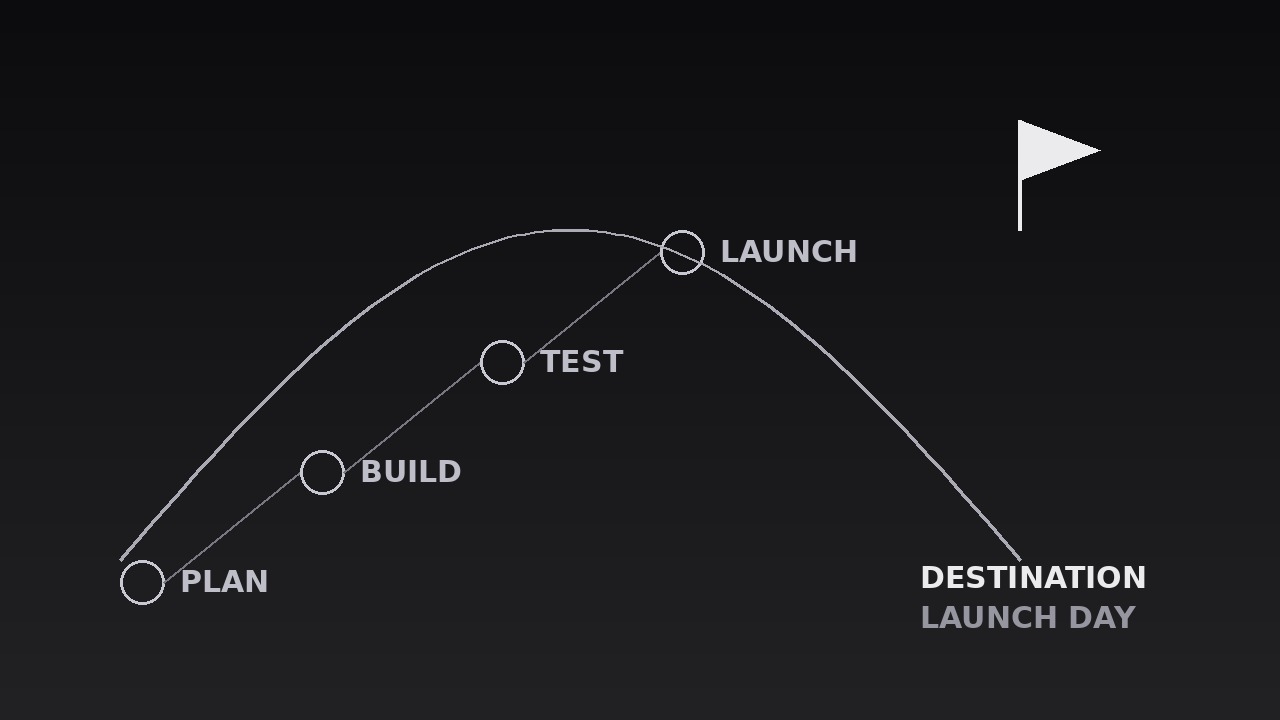
AIを、リストから目的地への橋のモーションデザイナーに変えます。ステップのチェックリストがフレームを弧を描いて1つの目的地へとつながり、やることリストを終点のある旅に変えます。リストが、導く先によってのみ意味を持つロードマップ、仕組みのセグメント、オンボーディングのために。
こんな方におすすめ
オンボーディング制作者、ロードマッププレゼンター、チュートリアル制作者の方
所要時間
20分
レベル
初級
3ステップでインストール
登録不要。CLIツールも不要です。お使いのAIを選んで、1行コピーして貼るだけです。
ご自分で入れたい場合は、スキルを購入($4.99)し、購入完了画面からZIPをダウンロードして、上のディレクトリに展開し、AIのセッションを再起動してください。結果は同じです。すでに購入済みの場合は、AIアシスタントにダウンロードしてもらうこともできます。
パックの内容
SKILL.md(手順書)1点とスターターテンプレート1点が入っています。プレビューはこちらです:
List to Destination Bridge
When to use
- A roadmap or plan video where a list of steps needs to feel like a journey, not a chore list
- A how-it-works segment where the process (steps 1–5) only matters because of the outcome at the end
- An onboarding or tutorial where the learner needs to see both the path and the destination before starting
- A pitch or proposal where the milestones build toward one launch, delivery, or decision
- A checklist video where the items are forgettable alone but meaningful as a route to a goal
- A strategy or curriculum overview where the audience should leave knowing the endpoint first, the steps second
Workflow
- Define the list and the destination (input: your plan → output: steps + endpoint)
Write the steps as 3–6 short items (≤5 words each) in the order they happen, and the destination as one noun phrase ("Launch day", "A signed contract", "Your first sale"). The destination must be a place the journey ends, not another task — if the last item and the destination are the same thing, the bridge leads nowhere. Cut any step that is not on the critical path: a bridge with eight planks sags, and a list with eight steps stops looking like a journey. If two steps always happen together, merge them; the audience counts planks, and every extra one dilutes the arrival. - Lay out the bridge (input: steps + endpoint → output: bridge layout)
Draw the bridge as a single arc or gentle S-curve across the frame: the first step at the lower-left, the destination at the upper-right (or right-of-centre on vertical), with the arc's peak near the middle. Each step sits on the arc as a node — a numbered dot or small card — spaced evenly along the curve, with the destination as the largest node, visually distinct (a flag, a star, a filled marker) and set apart from the step nodes. The arc itself is a thin line (2–3px) in a quiet colour; it is the path, not the decoration. Leave the space beneath the arc mostly empty: the journey needs air under it, and labels need room to breathe. - Label every plank (input: bridge layout → output: labelled steps)
Give each step node a short label (≤5 words) placed consistently — all labels above the arc, or all below it, never mixed — in a size readable on a phone. Add the step number to each node (1, 2, 3...) so the order is unmistakable even with the sound off. The destination gets its full name in type 1.5–2× the step-label size, plus one supporting line beneath it if the destination needs a qualifier ("Launch day — 1 June"). Never label the arc itself with text along the curve: curved text is hard to read and fights the nodes for attention. - Travel the bridge (input: labelled steps → output: travel animation)
Animate a traveller — a dot, a pulse, or a small marker — along the arc from step 1 to the destination, in sync with the narration. The traveller moves at a steady pace, pausing 500–700ms at each step node while the voiceover names that step; the step node lights up (fills, brightens, or scales to 1.15) during its pause, then settles back to a "visited" state (filled but quieter) as the traveller moves on. Total travel: 4–7 seconds for 3–6 steps. The visited-state trail matters: by the end, the audience can see the whole path already walked, which is what makes the arrival feel earned rather than teleported. - Arrive at the destination (input: travel animation → output: arrival beat)
When the traveller reaches the destination node, mark the arrival with exactly one flourish: the destination node scales to 1.2 and settles back over 300ms, a single ring expands from it (scale 1.0 → 1.6, opacity 60% → 0% over 500ms), or a short 200ms glow pulse — pick one. The destination label brightens to full strength at the same moment. Hold the completed bridge — all steps in visited state, destination lit — for 1.5–2 seconds while the voiceover states the destination plainly ("And that gets us to launch day"). The arrival is the payoff the whole sequence built toward; give it its full beat before cutting away. - Close with the whole bridge (input: arrival beat → output: finished sequence)
If the video continues, the bridge may stay on screen as a chapter marker: shrink it to a corner strip or a thin progress bar that keeps the visited steps visible while the next section covers step 1 in detail. If the sequence stands alone, end on the full bridge held for its 1.5–2 second beat, then cut hard to the next shot — never dissolve the bridge away, which reads as the journey evaporating. Never replay the travel in the same video: a second crossing makes the journey feel like a loop, not a destination reached.
テンプレートのプレビュー
List to Destination Bridge — Starter Template
A checklist becomes a journey: 3–6 steps on one arc, ending at one destination.
Journey: {title} | Sequence length target: {6–10s}
1. Steps (3–6, ≤5 words each, critical path only)
Cut test: every step is a gate the journey cannot skip — errands cut: [ ]
2. Destination (one noun phrase — a place, not another task)
- Destination: {Launch day / A signed contract / Your first sale / ...}
- Qualifier (one line, optional): {e.g. "1 June" / "in 30 days"}
- Destination ≠ last step check: [ ] (if they are the same, rewrite the destination)
3. Layout
スキルパック本体(SKILL.md とテンプレート)は英語で書かれています。


