Event Bar Chart
イベントの数字を、正直な1枚の棒グラフに。ゼロ基準、数値ラベル付き
AIをチャートデザイナーに変え、イベントの数字を、数値ラベル、ゼロ基準、そして結論を一言で示すタイトルを備えた、クリーンで正直な棒グラフに仕上げます。
3ステップでインストール
登録不要。CLIツールも不要です。お使いのAIを選んで、1行コピーして貼るだけです。
ご自分で入れたい場合は、スキルを購入($4.99)し、購入完了画面からZIPをダウンロードして、上のディレクトリに展開し、AIのセッションを再起動してください。結果は同じです。すでに購入済みの場合は、AIアシスタントにダウンロードしてもらうこともできます。
パックの内容
SKILL.md(手順書)1点とスターターテンプレート1点が入っています。プレビューはこちらです:
Event Bar Chart
When to use
- You need to show attendance, ticket sales, or session turnout for an event in a report or recap deck
- A sponsor update needs one chart proving how this year's event compared with last year's
- Your team is comparing sessions, stages, or ticket tiers and a table of numbers is not landing
- A post-event blog post needs a chart readers can grasp in five seconds
- You are presenting survey answers (for example, "how did you hear about us?") and bars beat a paragraph
Workflow
- Pick one message (input: event data → output: chart title sentence)
A bar chart answers one question: "Which session drew the biggest crowd?" or "Did ticket sales beat last year?" Write the answer as the chart's title before drawing anything. If you cannot state the message in one sentence, you have a data table, not a chart — split it. - Build the data table (input: raw numbers → output: clean category/value table)
List each category with exactly one value, using the same unit throughout (all attendees, all revenue, never mixed). Sort the bars deliberately: biggest-to-smallest for rankings, chronological for time series, and keep "Other" last. Drop categories with no data rather than plotting zeros as if they were real. - Choose orientation and scale (input: data table → output: chart geometry)
Short category names → vertical bars; long names → horizontal bars so labels stay readable. Start the value axis at zero — a truncated axis makes small differences look dramatic. If the range forces a break, say so on the chart, in words, next to the axis. - Label everything (input: chart geometry → output: labeled chart)
Put the exact value at the end of every bar so nobody has to estimate from the axis. Label the axis with its unit ("Attendees", "Tickets sold"), give the chart a source line ("Source: registration desk counts, 12 Oct"), and keep gridlines faint or drop them entirely. One highlight color for the bar the title refers to; everything else neutral. - Check honesty and legibility (input: labeled chart → output: approved file)
Read the chart as a skeptic: does the visual size of each bar match its number? Could anyone mistake a ranking for a time trend? View it at the size it will be published at — every label must still be readable. If the chart misleads at a glance, it fails no matter how pretty it is.
Output spec
- One bar chart (vertical or horizontal) with 2–12 categories, one value each
- Value axis starting at zero; unit labeled; source line included
- Exact value labeled on every bar; title states the finding in one sentence
- One highlight color maximum; neutral bars, faint or no gridlines
- Delivered with alt-text stating the chart's finding and its source
テンプレートのプレビュー
Event Bar Chart — Template
One chart = one message. Fill in the message before drawing anything.
Chart title (states the finding in one sentence)
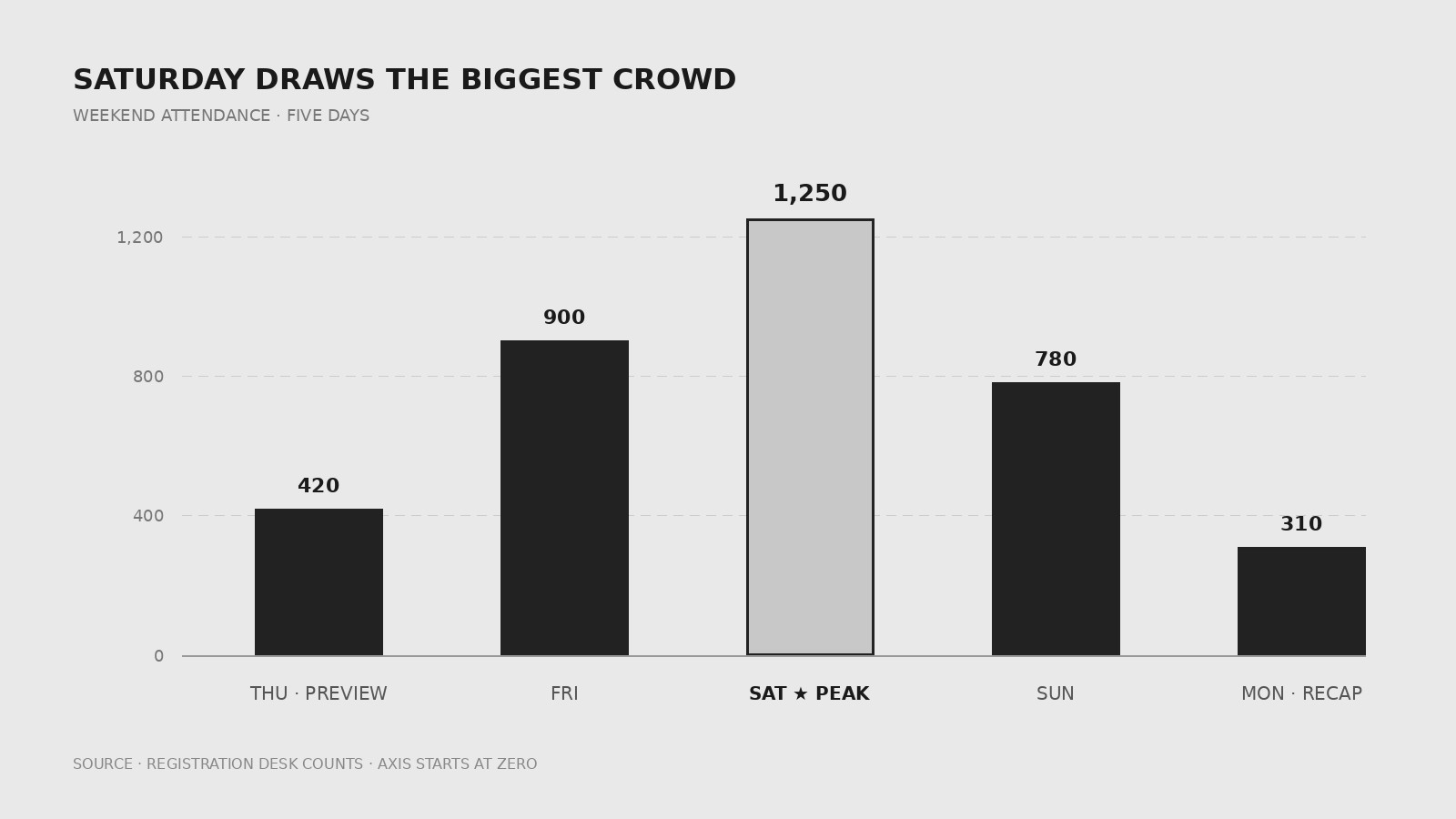
{Title: e.g. Saturday drew the biggest crowd of the weekend}
Question this chart answers: {e.g. Which day drew the biggest crowd?}
Data table (one value per category, same unit throughout)
Sort order: {biggest-to-smallest / chronological / other — and why} Estimates (if any): {which values are estimates — label them on the chart}
Geometry
Orientation: {vertical (short names) / horizontal (long names)} Value axis: starts at zero [ ] | Unit label: {e.g. Attendees}
スキルパック本体(SKILL.md とテンプレート)は英語で書かれています。


