List to Destination Bridge
Una checklist diventa un viaggio con una destinazione.
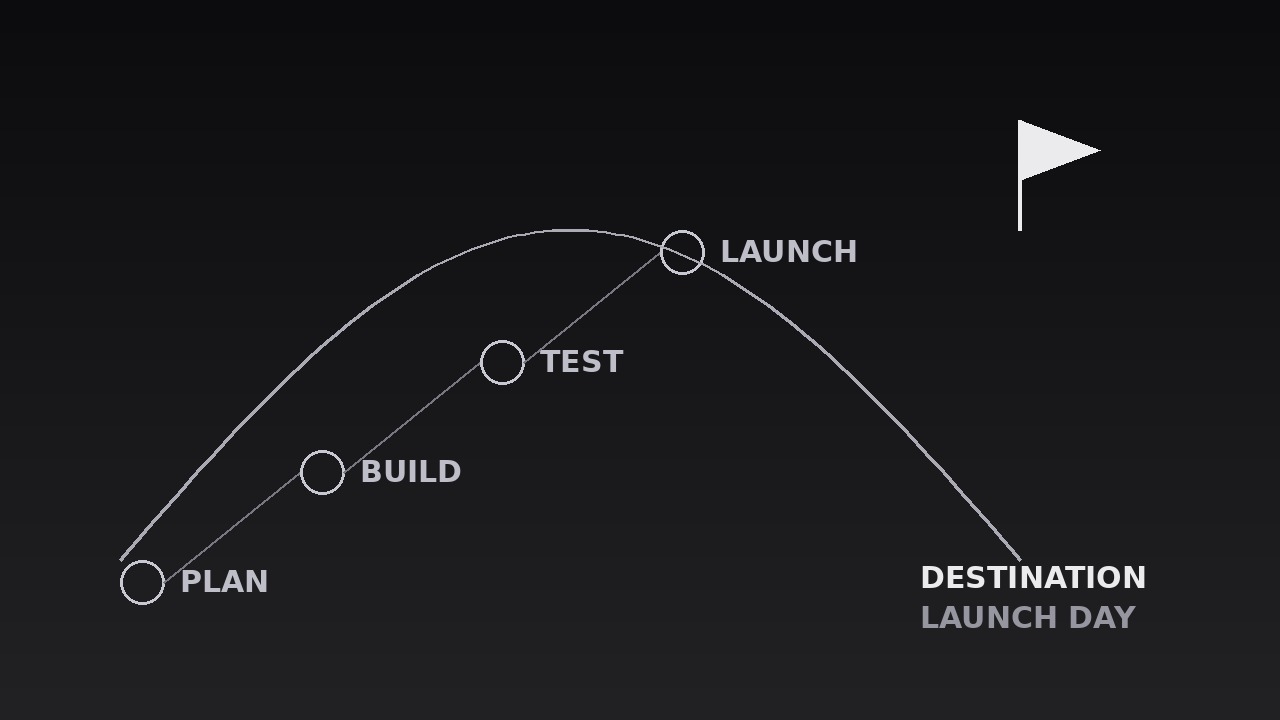
Trasforma la tua AI in un motion designer per ponti da lista a destinazione: una checklist di passaggi si inarca attraverso l'inquadratura verso un'unica destinazione, trasformando un elenco di cose da fare in un viaggio con un punto di arrivo. Per roadmap, segmenti su come funziona e onboarding in cui la lista conta solo per dove conduce.
Installala in 3 passaggi
Nessuna registrazione. Nessuno strumento da riga di comando. Scegli la tua AI, copia una riga e incollala.
Preferisci fare da te? Acquista la skill ($4.99), scarica lo ZIP dalla conferma d'acquisto, decomprimilo nella cartella mostrata sopra e riavvia la sessione della tua AI — stesso risultato. L'hai già acquistata? Il tuo assistente AI può scaricarla per te.
Cosa contiene
Un file SKILL.md (la guida operativa) + un modello di partenza. Un'anteprima:
List to Destination Bridge
When to use
- A roadmap or plan video where a list of steps needs to feel like a journey, not a chore list
- A how-it-works segment where the process (steps 1–5) only matters because of the outcome at the end
- An onboarding or tutorial where the learner needs to see both the path and the destination before starting
- A pitch or proposal where the milestones build toward one launch, delivery, or decision
- A checklist video where the items are forgettable alone but meaningful as a route to a goal
- A strategy or curriculum overview where the audience should leave knowing the endpoint first, the steps second
Workflow
- Define the list and the destination (input: your plan → output: steps + endpoint)
Write the steps as 3–6 short items (≤5 words each) in the order they happen, and the destination as one noun phrase ("Launch day", "A signed contract", "Your first sale"). The destination must be a place the journey ends, not another task — if the last item and the destination are the same thing, the bridge leads nowhere. Cut any step that is not on the critical path: a bridge with eight planks sags, and a list with eight steps stops looking like a journey. If two steps always happen together, merge them; the audience counts planks, and every extra one dilutes the arrival. - Lay out the bridge (input: steps + endpoint → output: bridge layout)
Draw the bridge as a single arc or gentle S-curve across the frame: the first step at the lower-left, the destination at the upper-right (or right-of-centre on vertical), with the arc's peak near the middle. Each step sits on the arc as a node — a numbered dot or small card — spaced evenly along the curve, with the destination as the largest node, visually distinct (a flag, a star, a filled marker) and set apart from the step nodes. The arc itself is a thin line (2–3px) in a quiet colour; it is the path, not the decoration. Leave the space beneath the arc mostly empty: the journey needs air under it, and labels need room to breathe. - Label every plank (input: bridge layout → output: labelled steps)
Give each step node a short label (≤5 words) placed consistently — all labels above the arc, or all below it, never mixed — in a size readable on a phone. Add the step number to each node (1, 2, 3...) so the order is unmistakable even with the sound off. The destination gets its full name in type 1.5–2× the step-label size, plus one supporting line beneath it if the destination needs a qualifier ("Launch day — 1 June"). Never label the arc itself with text along the curve: curved text is hard to read and fights the nodes for attention. - Travel the bridge (input: labelled steps → output: travel animation)
Animate a traveller — a dot, a pulse, or a small marker — along the arc from step 1 to the destination, in sync with the narration. The traveller moves at a steady pace, pausing 500–700ms at each step node while the voiceover names that step; the step node lights up (fills, brightens, or scales to 1.15) during its pause, then settles back to a "visited" state (filled but quieter) as the traveller moves on. Total travel: 4–7 seconds for 3–6 steps. The visited-state trail matters: by the end, the audience can see the whole path already walked, which is what makes the arrival feel earned rather than teleported. - Arrive at the destination (input: travel animation → output: arrival beat)
When the traveller reaches the destination node, mark the arrival with exactly one flourish: the destination node scales to 1.2 and settles back over 300ms, a single ring expands from it (scale 1.0 → 1.6, opacity 60% → 0% over 500ms), or a short 200ms glow pulse — pick one. The destination label brightens to full strength at the same moment. Hold the completed bridge — all steps in visited state, destination lit — for 1.5–2 seconds while the voiceover states the destination plainly ("And that gets us to launch day"). The arrival is the payoff the whole sequence built toward; give it its full beat before cutting away. - Close with the whole bridge (input: arrival beat → output: finished sequence)
If the video continues, the bridge may stay on screen as a chapter marker: shrink it to a corner strip or a thin progress bar that keeps the visited steps visible while the next section covers step 1 in detail. If the sequence stands alone, end on the full bridge held for its 1.5–2 second beat, then cut hard to the next shot — never dissolve the bridge away, which reads as the journey evaporating. Never replay the travel in the same video: a second crossing makes the journey feel like a loop, not a destination reached.
Anteprima del modello
List to Destination Bridge — Starter Template
A checklist becomes a journey: 3–6 steps on one arc, ending at one destination.
Journey: {title} | Sequence length target: {6–10s}
1. Steps (3–6, ≤5 words each, critical path only)
Cut test: every step is a gate the journey cannot skip — errands cut: [ ]
2. Destination (one noun phrase — a place, not another task)
- Destination: {Launch day / A signed contract / Your first sale / ...}
- Qualifier (one line, optional): {e.g. "1 June" / "in 30 days"}
- Destination ≠ last step check: [ ] (if they are the same, rewrite the destination)
3. Layout
Il pacchetto della skill (SKILL.md + modello) è scritto in inglese.


