Anchored Callout Reveal
Un punto, una linea, un'etichetta — che indicano esattamente un punto.
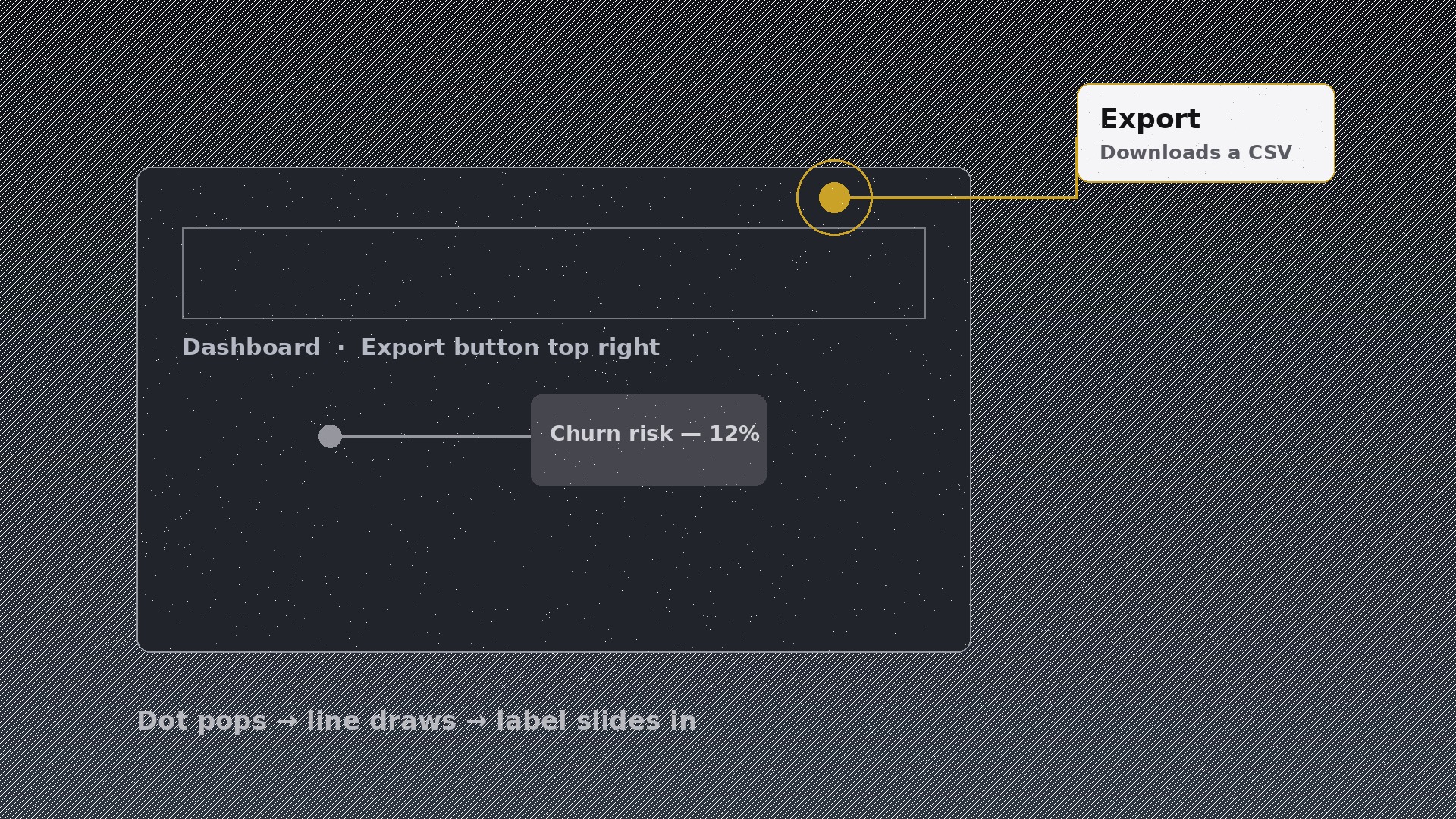
Insegna all'AI a produrre uno specifico schema di movimento: un'etichetta ancorata a un punto preciso sullo schermo si rivela in tre tempi — comparsa del punto, tracciatura della linea guida, scorrimento dell'etichetta — così gli spettatori collegano ogni etichetta al punto giusto.
Installala in 3 passaggi
Nessuna registrazione. Nessuno strumento da riga di comando. Scegli la tua AI, copia una riga e incollala.
Preferisci fare da te? Acquista la skill ($4.99), scarica lo ZIP dalla conferma d'acquisto, decomprimilo nella cartella mostrata sopra e riavvia la sessione della tua AI — stesso risultato. L'hai già acquistata? Il tuo assistente AI può scaricarla per te.
Cosa contiene
Un file SKILL.md (la guida operativa) + un modello di partenza. Un'anteprima:
Anchored Callout Reveal
When to use
- A product demo needs to name one specific button, port, or part without covering the screen in text
- A tutorial must point at an exact UI element or diagram detail and explain it in one line
- A map, chart, or technical diagram needs labels that sit outside the image but point precisely inward
- A comparison video must highlight one difference at a time, anchoring the eye to the right spot
- An onboarding video needs to walk viewers through a screen element by element
- You have a dense visual (dashboard, floor plan, engine diagram) and want to introduce labels one at a time
Workflow
- Pick the anchor points (input: your visual + script → output: anchor map)
Mark the exact pixel each callout points to — the corner of the button, the centre of the port, the peak of the chart. One callout per point, one point per callout; a callout that gestures vaguely at a region is a caption, not a callout. Order the anchors by the story (top-to-bottom or workflow order), and cap the sequence at 5–6 callouts per scene — beyond that, split the scene. The anchor dot is the contract: everything in the callout must be true of that exact spot. - Write the callout copy (input: anchor map → output: callout lines)
Each callout gets a short bold label (2–4 words: "USB-C port", "Churn risk") plus one supporting line of ≤10 words. No paragraph callouts — a callout is a pointer with a name, not a text box. If a point needs more explanation, the voiceover or the next scene carries it. Check each line against its anchor: would a viewer looking at the dot learn the right thing from this label alone? If not, rewrite the label, not the layout. - Lay out the leader line and label (input: callout lines → output: layout)
Place the label box outside the busy part of the frame (or in a clear margin), with the leader line running from the box to the anchor dot in one or two straight segments — never a curve that wanders, never a line that crosses another callout's line. The dot is 6–10px, filled, in the accent colour; the line is 1.5–2px in the same colour at 80% opacity; the box is a clean pill or rounded rectangle with the label inside. Keep a minimum 24px gap between neighbouring label boxes so callouts never collide. - Set the reveal choreography (input: layout → output: keyframe spec)
The reveal has a strict three-beat order, always: (1) the anchor dot pops in — scale 0 → 1.25 → 1 over 180ms with ease-out back, plus a one-time 300ms expanding ring (stroke fading, scale 1 → 2.2) to catch the eye; (2) the leader line draws from the dot outward to the label — stroke-dashoffset animation, 220ms, ease-in-out, starting 60ms after the dot lands; (3) the label box fades + slides 8px in along the line's direction over 180ms, starting 80ms after the line begins. Total reveal ≈ 500ms per callout. The dot never moves after landing — the anchor is a fact, and a drifting anchor breaks trust in the pointing. - Sequence and dismiss callouts (input: keyframe spec → output: finished motion)
Space callouts 600–900ms apart so each gets a beat of attention. When the next callout arrives, the previous one dims to 35% opacity (its line and dot stay visible — the map of what's been covered remains) rather than vanishing. At the end of the sequence, hold all callouts for ≥1s so the fully annotated frame can be read, then dismiss all together with a 250ms fade. Never leave a callout's dot pointing at something after its label has disappeared — dot, line, and label are one object with one lifetime. - Check pointing accuracy and clutter (input: finished motion → output: verified animation)
Freeze each callout at full reveal and ask: does the dot sit exactly on the thing the label names, with no ambiguity? If the dot could plausibly point at two neighbouring elements, move it or zoom the visual. Check the fully annotated frame: can you still see the underlying visual, or have callouts buried it? If labels cover more than ~35% of the frame, reduce callouts or move labels to the margins. Test on a phone screen — leader lines thinner than 1.5px and labels below 14px disappear there.
Anteprima del modello
Anchored Callout Reveal — Starter Template
Fill in every {placeholder}. One callout per point, one point per callout — a callout that gestures at a region is a caption, not a callout.
Scene
- Visual being annotated: {dashboard_screenshot | diagram | map | chart | floor_plan | photo}
- Visual size: {width × height}px · Callout count: {≤6 per scene}
Anchor map (exact pixels — measure, don't guess)
Callout copy (label 2–4 words + supporting line ≤10 words)
- {label_1} — {supporting_line_1}
- {label_2} — {supporting_line_2}
- {label_3} — {supporting_line_3}
- {label_4} — {supporting_line_4}
Layout
Il pacchetto della skill (SKILL.md + modello) è scritto in inglese.


