Surrounding Term Pressure
Serrez un mot-clé jusqu’à ce qu’il s’imprime.
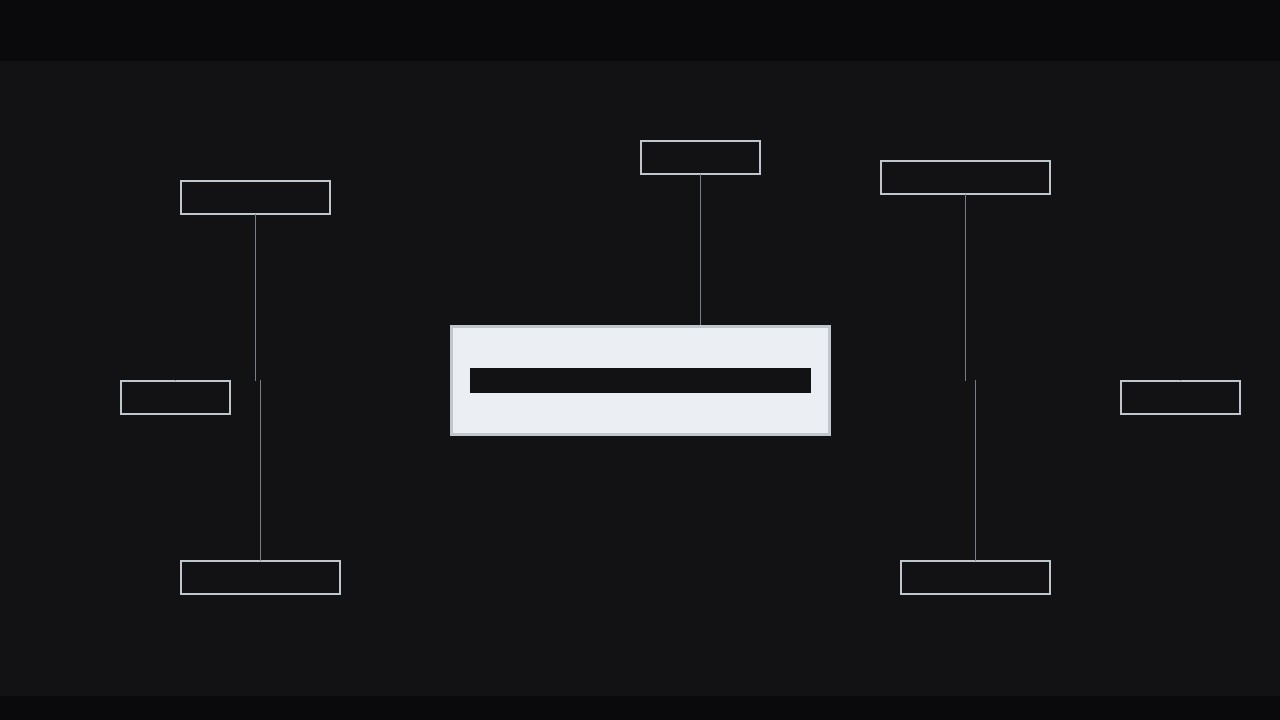
Un effet de typographie cinétique où les mots autour d’un terme central pressent vers l’intérieur, tiennent un instant, puis se relâchent — pour que le seul mot qui compte atterrisse avec une vraie force. Inclut le minutage de la pression, les signaux de pression et la synchronisation audio.
Installez-la en 3 étapes
Sans inscription. Sans outils en ligne de commande. Choisissez votre IA, copiez une ligne, collez-la.
Vous préférez le faire vous-même ? Achetez la compétence ($4.99), téléchargez le ZIP depuis votre confirmation d'achat, décompressez-le dans le répertoire indiqué ci-dessus, redémarrez votre session IA — même résultat. Vous l'avez déjà achetée ? Votre assistant IA peut la télécharger pour vous.
Contenu du pack
Un fichier SKILL.md (le guide pratique) + un modèle de départ. Aperçu :
Surrounding Term Pressure
When to use
- You are defining a term on screen and want the audience to remember that one word, not the whole sentence
- An explainer video reaches its thesis statement and the key concept deserves a visual punch
- You are contrasting a central idea against its neighbours — the alternatives, the symptoms, the causes — and the centre must win
- A title card needs motion but the message is a single word, and a plain fade-in feels flat
- You are building a kinetic-typography sequence where one beat in the voiceover carries the whole argument
Workflow
- Pick the hero term (input: script sentence → output: one hero term + 4–8 surrounding terms)
Read the sentence aloud and mark the single word the audience must remember. That is the hero term — one word, or two at most. Everything else in the sentence becomes surrounding terms: the context words, the alternatives, the causes, the consequences. If you cannot pick one hero, the sentence is doing two jobs — split it. A pressure effect with two heroes reads as a collision, not an emphasis. Write the hero term in the heaviest weight you have; the surrounding terms go one or two weights lighter so the hierarchy is obvious even on a frozen frame. - Lay out the pressure field (input: terms → output: static composition with hero centred and satellites placed)
Put the hero term dead centre, large — roughly 18–24% of frame height for a 1080p canvas. Arrange the surrounding terms in a loose ring or two loose arcs around it, at 55–70% of the hero's size, with generous gaps: at rest, nothing should touch the hero. Vary the satellite positions — some above, some below, some left and right — so the ring feels like a crowd, not a border. Keep every satellite fully legible; if a word is too small to read at rest, it is decoration, and decoration weakens the effect. Set the background to a flat, quiet tone so the type is the only thing moving. - Animate the squeeze (input: static composition → output: squeeze pass with keyframed inward motion)
This is the core move. Over 12–15 frames (0.5–0.6 s at 24–25 fps), every surrounding term travels inward toward the hero by 12–18% of its distance from centre, easing out (fast start, soft landing — cubic-bezier(0.16, 1, 0.3, 1) or your tool's ease-out). The hero term itself does not move; instead it compresses slightly — scale X to 96–97% for the same 12–15 frames, as if bracing. Hold the squeezed position for 6–8 frames (about 0.3 s): this hold is where the audience feels the pressure. Then release over 10–12 frames with ease-in-out, satellites returning to their rest positions and the hero springing back to 100% with a 2-frame overshoot to 101% before settling. Total move: roughly 1.2–1.4 seconds. Loop it once more only if the voiceover dwells on the term; otherwise one squeeze per term is enough. - Add the pressure cues (input: squeeze pass → output: finished motion with weight, spacing, and blur cues)
Motion alone sells the squeeze, but three small cues sell the force behind it. First, letter-spacing: as satellites move inward, tighten their tracking by 5–10% so the words themselves feel compressed. Second, weight: bump the hero term one weight heavier (or add a 1–2 px stroke / faux-bold) during the hold, then release it with the motion. Third, depth: add a 1–2 px directional blur to the satellites during the inward travel only, clearing to sharp on the hold — the blur reads as speed, the sharp hold reads as impact. Optional: a faint radial vignette that deepens by 5–8% during the hold, centred on the hero. Use at most two of these cues at once; all four together looks like a filter demo. - Time it to voice or beat (input: finished motion → output: timed cut locked to audio)
Place the start of the inward travel 2–3 frames before the hero word is spoken, so the squeeze lands exactly on the spoken word. If there is no voiceover, cut the squeeze to land on the musical beat or on the moment the sentence appears. Never let the squeeze finish after the word has passed — a late squeeze feels like an echo, not an emphasis. If the sentence has two emphasis beats, use this effect once, on the stronger one, and use a plain fade or slide for the other. Two squeezes in one sentence cancel each other out. - Polish and export (input: timed cut → output: final render, 1920×1080, plus a loop-safe variant)
Check the hold frame at full resolution: is every satellite legible, is the hero crisp, does anything overlap? Overlap during the squeeze is the most common flaw — if two satellites collide, push their rest positions apart and re-render. Check the release: the hero's 101% overshoot must settle within 3 frames or it looks like a bounce. Export the main cut at your project settings, and export a second version with the squeeze looped twice (squeeze–hold–release–rest–squeeze) for use as a looping title card or social clip.
Aperçu du modèle
Surrounding Term Pressure — Build Template
Fill this in before animating. One hero term per composition.
The sentence
> {full sentence as spoken or shown}
Hero term (1–2 words): {term} Why this word matters: {one line — what the audience must remember}
Surrounding terms (4–8)
Composition
- Canvas: {1920×1080 / 1080×1920}
- Background: {flat colour / darkened plate}
- Hero size: {% of frame height, target 18–24%}
- Hero weight: {weight} | Satellite weight: {one–two weights lighter}
- Satellite size: {% of hero size, target 55–70%}
Squeeze timing (24–25 fps)
Total: {~1.2–1.4 s}
Pressure cues (pick at most TWO)
Le pack de compétence lui-même (SKILL.md + modèle) est rédigé en anglais.


