Orbit Admin Dashboard
Un tableau de bord où chaque module orbite autour d'un hub de statut en direct.
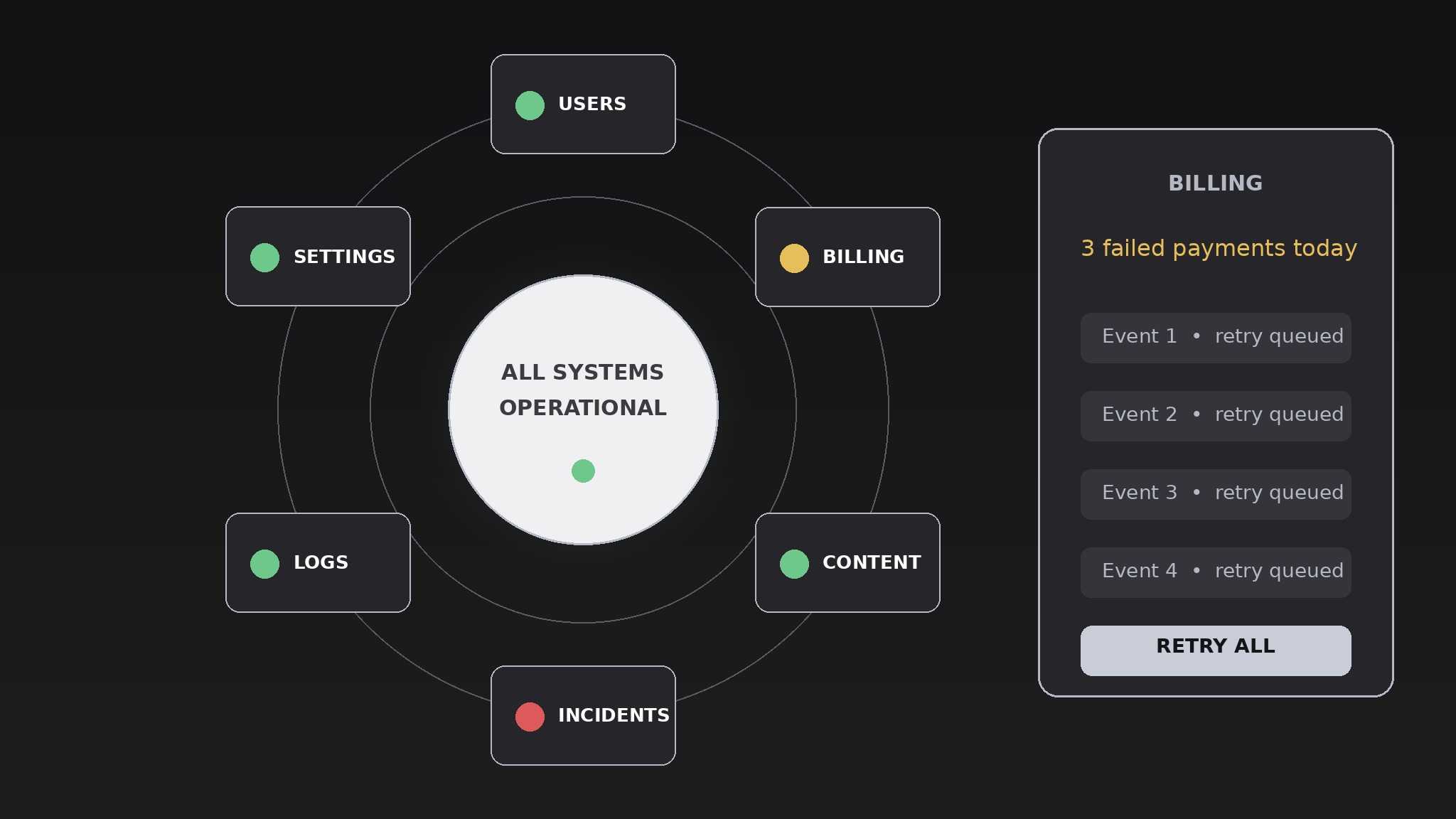
Transforme votre IA en designer de tableaux de bord — elle organise les modules de supervision autour d'un hub central de statut en temps réel, pour que les administrateurs voient d'abord la santé du système et puissent explorer chaque module sans perdre le contexte.
Installez-la en 3 étapes
Sans inscription. Sans outils en ligne de commande. Choisissez votre IA, copiez une ligne, collez-la.
Vous préférez le faire vous-même ? Achetez la compétence ($4.99), téléchargez le ZIP depuis votre confirmation d'achat, décompressez-le dans le répertoire indiqué ci-dessus, redémarrez votre session IA — même résultat. Vous l'avez déjà achetée ? Votre assistant IA peut la télécharger pour vous.
Contenu du pack
Un fichier SKILL.md (le guide pratique) + un modèle de départ. Aperçu :
Orbit Admin Dashboard
When to use
- You're designing an admin console for a product and the first screen is currently a wall of tables nobody reads
- Admins keep missing outages because the health signal is buried three clicks deep
- Your dashboard has grown to a dozen modules and navigation has become a scavenger hunt
- You need one screen that answers "is everything OK?" in three seconds and "what exactly is wrong?" in two clicks
- You're redesigning an existing admin panel and want a layout that scales as modules get added
Workflow
- Name the hub metric (input: what the product does → output: one hub status)
Pick the single status the hub shows: overall system health, active incidents, or the one number the business lives by (orders flowing, users online, jobs queued). The hub is one glanceable answer, not a dashboard-in-miniature — a green/amber/red state, a headline number, and a one-line note ("2 incidents open, both acknowledged"). If you can't pick one hub metric, the product's priorities aren't settled yet, and no layout will fix that. - Sort modules by urgency (input: all admin modules → output: ranked module list)
List every module the dashboard needs — users, billing, content, incidents, logs, settings, analytics — and rank them by how often an admin opens them in a hurry. The top four to six become the orbit ring; the rest become a secondary shelf or a menu. A module nobody opens in a hurry doesn't earn a permanent orbit slot, however important it feels in a planning meeting. - Design the orbit layout (input: ranked module list → output: layout spec)
Place the hub at the center and the orbit modules around it in a ring, ordered by urgency clockwise from the top. Each orbit module shows its own mini-status (a count, a sparkline, a dot) so the ring itself is informative — an admin should spot the one red module without clicking anything. Keep the ring to six modules maximum; beyond that the orbit becomes a crowded carousel and the glance value collapses. The layout spec states the hub content, the ring order, what each module's mini-status shows, and the behavior at narrow widths (ring collapses to a stacked list, hub stays pinned to the top). - Define drill-down behavior (input: layout spec → output: interaction spec)
Clicking an orbit module opens its detail panel beside the hub — never as a full-page replacement that hides the hub. The hub stays visible so the admin never loses the overall picture while investigating one module. Define the return path too: one click (or the Escape key) closes the panel and restores the ring. Every detail panel gets the same three-part shape — current state, the five most recent events, and the one or two actions admins actually take — so no module feels like a different product. - Stress-test with real data (input: interaction spec + real data → output: verified dashboard design)
Render the design with the ugliest real data you have: a module with zero events, a module with 400 alerts, a 40-character username, an incident title that runs three lines. The orbit must survive all of them without overlapping, truncating meaning away, or pushing the hub off screen. Test the all-red state too — if three modules go red at once, the design must still show which one is worst, not just paint everything the same alarming color.
Aperçu du modèle
Orbit Admin Dashboard — Design Template
One hub, one ring. Fill in the hub before placing any module.
Hub
Hub status: {overall system health / open incidents / the one number the business lives by} Hub states: 🟢 {what green means} / 🟡 {what amber means} / 🔴 {what red means} Headline number: {number + label} One-line note: {e.g. "2 incidents open, both acknowledged"}
Module ranking (by how often an admin opens it in a hurry)
Orbit ring (max 6): {modules 1–6, in urgency order clockwise from top} Secondary shelf: {remaining modules + how they're reached}
Orbit layout
Le pack de compétence lui-même (SKILL.md + modèle) est rédigé en anglais.
Vous aimerez aussi
 Autres
Continuity Asset Set
Un kit unique pour que chaque livrable donne l'impression de faire partie du même ensemble.
 Autres
Device-Canvas Product Launch
Un grand canevas d’appareil porte toute votre histoire de lancement.
 Autres
Frame-Token Editorial Launch
Un seul jeu de tokens, tous vos assets, zéro dérive.