One Query Multiple Screens
Une question saisie une fois, des réponses sur chaque écran
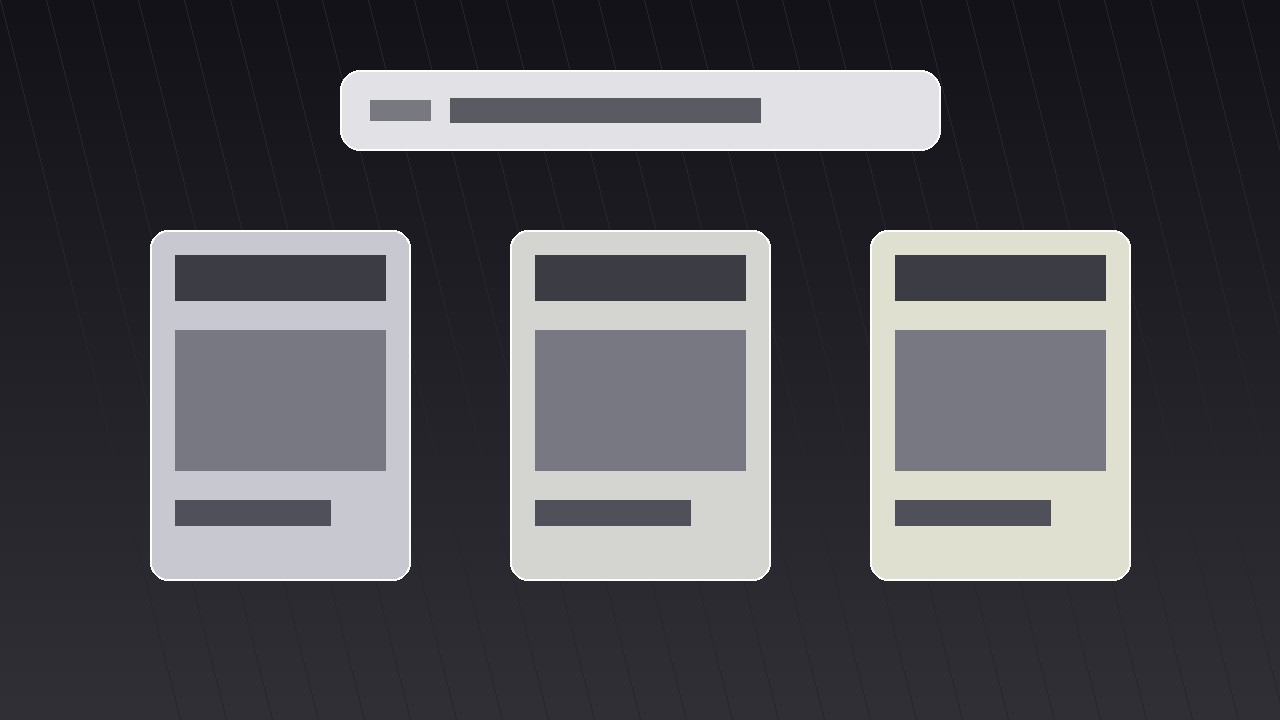
Transforme votre IA en réalisateur d’animations graphiques pour le motif une requête, plusieurs écrans — il saisit une requête une seule fois, puis la déploie sur plusieurs écrans qui répondent chacun différemment, pour que les spectateurs saisissent l’étendue sans une seule image encombrée.
Installez-la en 3 étapes
Sans inscription. Sans outils en ligne de commande. Choisissez votre IA, copiez une ligne, collez-la.
Vous préférez le faire vous-même ? Achetez la compétence ($4.99), téléchargez le ZIP depuis votre confirmation d'achat, décompressez-le dans le répertoire indiqué ci-dessus, redémarrez votre session IA — même résultat. Vous l'avez déjà achetée ? Votre assistant IA peut la télécharger pour vous.
Contenu du pack
Un fichier SKILL.md (le guide pratique) + un modèle de départ. Aperçu :
One Query Multiple Screens
When to use
- Your video needs to show that one question has many valid answers — different tools, different angles, different outcomes — without reading a list aloud
- A product demo where the same search, prompt, or command produces different results on phone, desktop, and tablet
- An explainer comparing how several apps, sites, or AI tools respond to the exact same input
- A launch video where one feature fans out into several use cases across screens
- A tutorial intro that previews everything the video will cover, one screen per chapter, before diving in
Workflow
- Lock the one query (input: your topic → output: a single short query line)
Write the query exactly as it will appear on screen — 3 to 8 words, plain language, no jargon. "Best budget laptop," "Plan a weekend in Lisbon," "Fix a leaking tap." This line is the anchor of the whole shot: it gets typed once, centered, in the largest type on screen, and it never changes while the screens branch. If the query needs explaining, it is too long — shorten it until a stranger understands it in two seconds. Everything downstream (screen count, screen content, timing) hangs off this one line, so approve it before building anything else. - Assign one answer per screen (input: query → output: 3–4 screen briefs)
Choose three or four screens — never more than four, or each panel shrinks past readability. Give each screen exactly one job: one answer, one app, one outcome. Write a one-line brief per screen: what it shows, what the headline inside it reads, and what makes it different from its neighbours. The differences must be visible at a glance — different images, different numbers, different verdicts — not four near-identical screenshots. If two screens would look the same, merge them and use the freed slot for a genuinely different angle. - Choreograph the branch (input: screen briefs → output: timed motion plan)
The query types on center screen over ~1.2 seconds, holds for a beat (~0.4 s), then the screens branch outward. Standard timing: the query line scales down to ~85% and slides to the top third while the panels slide or scale in from behind it, staggered 0.12–0.18 s apart, each with an ease-out-cubic curve so they decelerate into place. Total branch move: 0.6–0.9 s. Panels arrive in reading order — left to right, or top-left clockwise — so the eye follows a path instead of hunting. Add a soft drop shadow the moment a panel lands; it sells depth and separates overlapping edges. - Fill each screen with scannable content (input: screen briefs → output: per-screen layouts)
Each panel gets the same internal skeleton: a small label at the top (app name, angle, or category), one hero element (screenshot, photo, or big number), and one caption line of at most 6 words. Keep body text out of the panels entirely — if a panel needs a paragraph, the idea belongs in voiceover, not on screen. Font size inside panels must stay legible at the final panel size, not at full-screen size; test by viewing the finished frame at 50% zoom. Use one accent colour per panel at most, and keep the query line in a neutral tone so it stays the parent of the composition. - Hold, highlight, and exit (input: finished layout → output: hold-and-exit plan)
Hold the full multi-screen frame for 2.5–4 seconds so viewers can actually read it — this is a reading shot, not a flash. During the hold, add one guided highlight: a thin outline, a slight scale-up (103–105%), or a brightness lift on one panel at a time, moving in reading order, ~0.7 s per panel. Never highlight two panels at once. To exit, either collapse the panels back into the query line (reverse the branch, 0.5 s) or push the whole grid off-screen as the voiceover transitions. The collapse-back exit is the cleaner choice when the next shot answers one of the panels in detail — it tells the viewer "we are zooming into this one." - Render and check legibility (input: motion plan → output: final clip)
Render a draft and watch it on a phone, not just a desktop monitor: most viewers meet this pattern on small screens. Check three things: the query line is readable in the first second, each panel's headline is readable during the hold, and no two panels animate at exactly the same instant (simultaneous motion reads as a glitch, staggered motion reads as intention). If any panel's text fails the phone test, cut words before shrinking the panel count — and if cutting words fails, drop to three screens.
Aperçu du modèle
One Query Multiple Screens — Starter Template
One query, several screens, one frame. Fill in the query first — everything else hangs off it.
The query
Query (3–8 words, exactly as typed on screen): {query}
Voiceover line: "Same question — {number} very different answers."
Screen briefs (3–4 screens, one answer each)
Cut check: if any two screens would look alike, merge them. Difference must be visible at a glance.
Motion plan
Panel entry order (reading order): {1 → 2 → 3 → 4}
Per-panel layout checklist
- [ ] Label at top (app / angle / category)
- [ ] One hero element only
- [ ] One caption, ≤6 words
- [ ] No body text inside panels
Le pack de compétence lui-même (SKILL.md + modèle) est rédigé en anglais.


