Milestone with Detail Branch
Un jalon s’ouvre — ses sous-tâches se ramifient hors de la ligne.
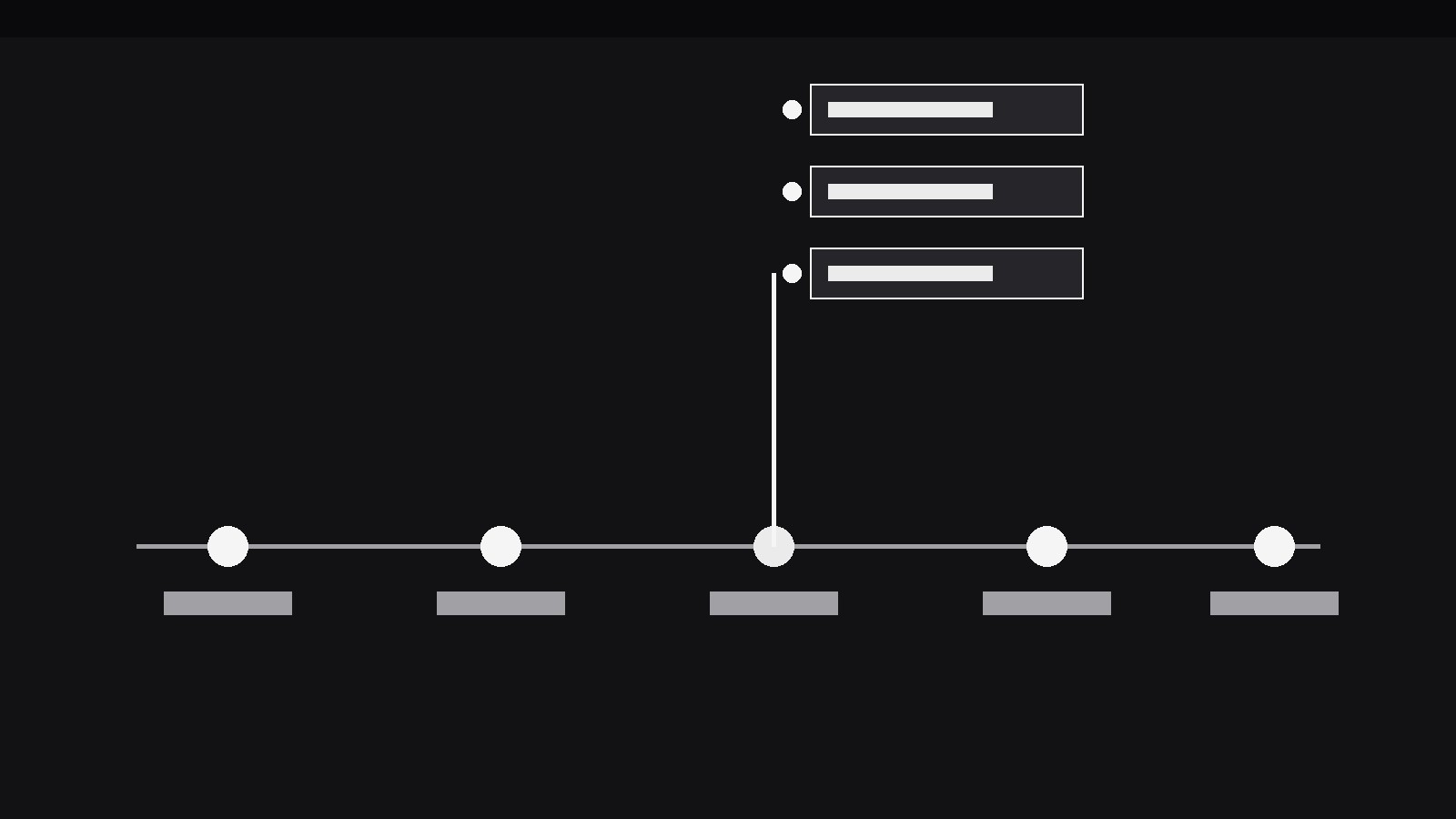
Transforme votre IA en motion designer pour un motif précis — un jalon de la frise fait pousser une branche de détail qui s’écarte de la ligne principale et présente les sous-tâches et les preuves derrière ce jalon, sans rompre le fil de la chronologie. Pour les feuilles de route, les rétrospectives et les récits de projet où une date mérite son propre gros plan.
Installez-la en 3 étapes
Sans inscription. Sans outils en ligne de commande. Choisissez votre IA, copiez une ligne, collez-la.
Vous préférez le faire vous-même ? Achetez la compétence ($4.99), téléchargez le ZIP depuis votre confirmation d'achat, décompressez-le dans le répertoire indiqué ci-dessus, redémarrez votre session IA — même résultat. Vous l'avez déjà achetée ? Votre assistant IA peut la télécharger pour vous.
Contenu du pack
Un fichier SKILL.md (le guide pratique) + un modèle de départ. Aperçu :
Milestone with Detail Branch
When to use
- A roadmap video reaches a milestone that hides real complexity ("Beta launch") and the audience deserves to see what that milestone actually contained
- A retrospective walks a timeline of a project and one date needs its sub-tasks, owners, or evidence shown without derailing the whole timeline
- A pitch deck's timeline slide has one milestone the presenter will be asked about — the branch pre-answers the question in the video version
- A release-notes video lists versions on a timeline and one release needs its feature list expanded in place
- A project story needs to show that a milestone was a container (many small pieces) rather than a single event, while keeping the overall chronology readable
- A status update shows a timeline with one milestone at risk, and the branch holds the blockers and next steps for exactly that milestone
Workflow
- Build the main timeline first (input: your dates + milestones → output: timeline)
Lay out the full timeline before any branch exists: a single horizontal (or vertical) line, evenly spaced milestones, each with a short label (2–4 words) and a date. The timeline must read cleanly with zero branches — if it doesn't, the branch will only add noise to confusion. Cap the timeline at 4–6 milestones per scene; more than that, and the branch has no room to grow. The milestone that will branch gets no special treatment yet — same dot, same label weight as the others — because the branch is a surprise the timeline earns, not a decoration it starts with. - Choose the branch content (input: timeline → output: branch payload)
Decide what the branch holds: 2–5 items, each one short line — sub-tasks, features, evidence, or blockers. Every item gets a label (≤6 words) and, where it helps, one tiny status mark (done, in progress, blocked) in the same vocabulary across all items. Cut ruthlessly: the branch is a close-up of one milestone, not a second timeline. If the branch needs more than 5 items, it is a scene of its own — give it one, and let the timeline resume after. Write the branch payload before animating anything; a branch whose content is invented mid-animation always ends up lopsided. - Grow the branch (input: branch payload → output: branch animation)
The branch grows out of the milestone's dot in one continuous move, 500–650ms, ease-out: a connector stem extends from the dot (perpendicular to the timeline — upward on a horizontal timeline, or sideways on a vertical one), then the branch items appear along it one at a time, 120–180ms apart, each fading + sliding 6px in from the stem. The stem is 1.5–2px in the timeline's own colour; the items sit in a small stacked panel or as bare lines with short leader ticks. While the branch grows, the rest of the timeline dims to 40% opacity — the branch is the subject now, and the dimmed timeline is its context. The milestone dot itself scales up slightly (1 → 1.3) and stays up while its branch is open. - Hold the branched frame (input: branch animation → output: readable frame)
Hold the fully grown branch for at least 1.8s, longer if items carry status marks the viewer must decode. This is the only moment the viewer can read the branch, so protect it: no other motion on screen, no camera drift, no next milestone pre-animating. If an item needs emphasis (the blocker, the headline feature), give it a single treatment — bold weight or the accent colour — and leave the rest plain. Two emphasised items are an argument; one is a pointer. - Collapse or carry forward (input: branched frame → output: next beat)
Decide the exit in advance. Collapse: the branch retracts in reverse (items fade out bottom-to-top, stem shrinks back into the dot, 350–450ms), the timeline returns to full opacity, and the walk continues to the next milestone. Carry forward: the branch stays open while the timeline advances — only workable when the branch sits to the side and later milestones are short, and only for one branch at a time; two open branches turn the timeline into a tree. Never leave a branch half-collapsed, and never open a second branch while the first is still growing. The collapse is the pattern's punctuation: it tells the viewer the close-up is over. - Check the timeline still reads (input: finished sequence → output: verified animation)
Watch the whole sequence with the sound off and ask: can I still say what happened, in order, after watching once? If the branch made the viewer lose the timeline's thread, the branch was too big, too long, or placed over a milestone the timeline couldn't spare. Check the branch at phone width: a horizontal timeline's upward branch must not run off the top of the frame, and a vertical timeline's sideways branch must not squeeze the main line into a sliver. If space is tight, the branch can grow over a dimmed background panel — but the timeline line itself must stay visible behind it, so the branch never reads as a detached popup.
Aperçu du modèle
Milestone with Detail Branch — Starter Template
Build the timeline first, then the branch. One branch open at a time.
Timeline (4–6 milestones, must read clean with zero branches)
Branch payload (2–5 items, ≤6 words each)
Branching milestone: {e.g. Beta launch}
> At most one emphasised item. If the branch needs 6+ items, it is its own scene, not a branch.
Animation
- Branch growth: {500–650ms ease-out} — stem from the dot, items 120–180ms apart
- Timeline dim while open: {40% opacity} | Branching dot scale: {1 → 1.3}
- Hold: {≥1.8s} of stillness, no other motion
Le pack de compétence lui-même (SKILL.md + modèle) est rédigé en anglais.


