Hub Routing
Tout passe par un seul hub — et chaque trajet reste traçable.
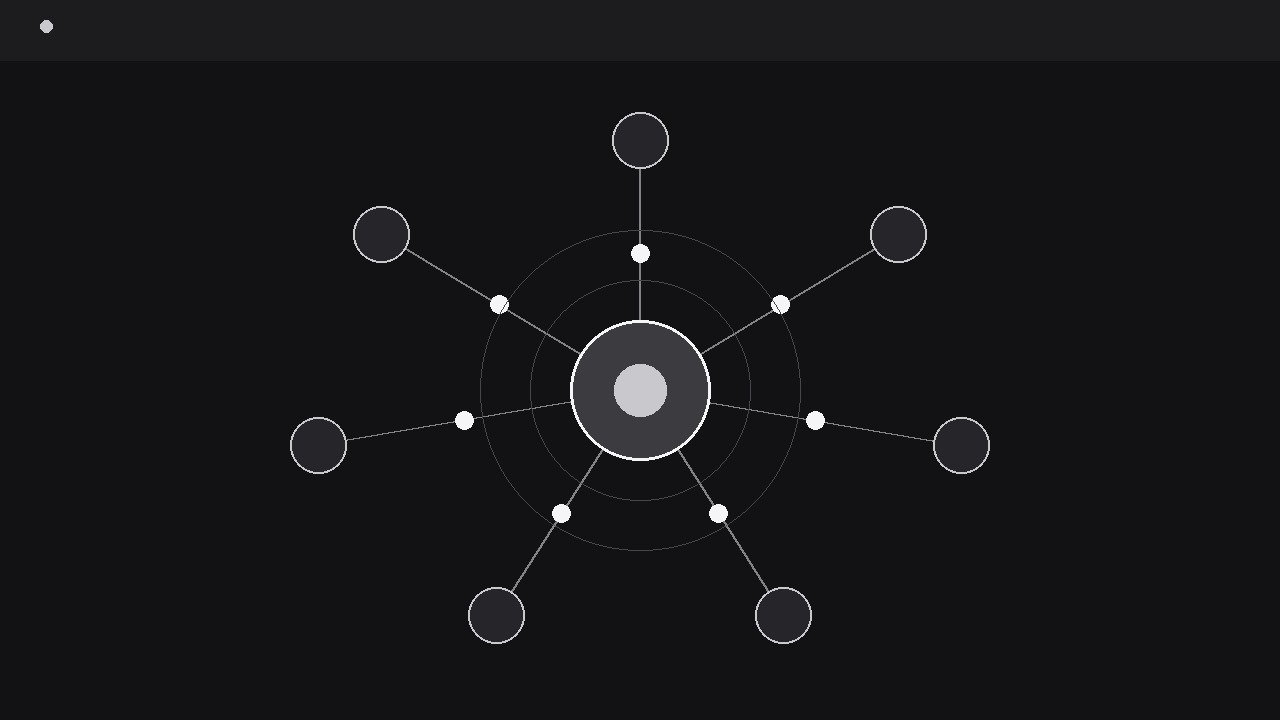
Transforme votre IA en directrice d'animation graphique pour le routage en étoile — prend un hub central et ses destinations, trace des routes propres vers l'extérieur, et anime des paquets voyageant sur chaque trajet pour que le public voie comment tout transite par un seul centre. Pour les explicatifs sur les réseaux, la logistique, les plateformes et tout système doté d'un point de coordination unique.
Installez-la en 3 étapes
Sans inscription. Sans outils en ligne de commande. Choisissez votre IA, copiez une ligne, collez-la.
Vous préférez le faire vous-même ? Achetez la compétence ($4.99), téléchargez le ZIP depuis votre confirmation d'achat, décompressez-le dans le répertoire indiqué ci-dessus, redémarrez votre session IA — même résultat. Vous l'avez déjà achetée ? Votre assistant IA peut la télécharger pour vous.
Contenu du pack
Un fichier SKILL.md (le guide pratique) + un modèle de départ. Aperçu :
Hub Routing
When to use
- An explainer video needs to show how a platform, warehouse, server, or control centre connects to many destinations at once
- A logistics or delivery video traces parcels, vehicles, or messages from one depot out to a set of stops and back
- A network or architecture overview has to make a central service understandable without a wall of boxes and arrows
- A product demo shows how one dashboard, inbox, or API routes work to different teams, tools, or locations
- A pitch video needs a single image that says "everything flows through us" and then proves it by moving traffic along every route
Workflow
- Define the hub and the spokes (input: system to explain → output: hub-spoke map)
Start on paper: one hub, and the destinations it serves. Name the hub in one or two words ("Central warehouse", "Main server", "Dispatch") and name each spoke the same way — every spoke is a real destination, not a category. Cap the spokes at eight; beyond that the routes tangle and the centre becomes a knot. For each spoke, write what travels along its route in one phrase ("orders", "sensor readings", "support tickets") and whether traffic is one-way (hub → spoke), inbound (spoke → hub), or two-way. If two spokes need the same route drawn twice, merge them: duplicate routes are the first sign the map is modelling org-chart politics instead of actual flows. Decide now what the packets are — the visible dots or tokens that travel the routes — and keep them identical across all spokes so the audience reads "same kind of traffic, different destinations". - Lay out the geometry (input: hub-spoke map → output: static layout)
Place the hub at the visual centre (or slightly left of centre if a caption column is planned on the right) and arrange the spokes in a balanced ring around it — roughly even angular spacing, with the most important spokes at the top and the sides rather than buried at the bottom. Routes are smooth curves, not straight lines: a gentle bend (control point offset 15–25% of the route length) keeps parallel routes from overlapping and gives each path its own identity. Draw every route at low opacity first, as a faint track, so the full network is visible before anything moves — the audience should see the whole shape in the first second. Spoke labels sit outside the ring, aligned outward from each spoke, and never cross a route. If two routes must cross, give the crossing a small bridge gap (one route visually passes over the other with a 4 px break) rather than letting lines merge into an ambiguous X. - Establish the hub pulse (input: static layout → output: hub with idle life)
Before any traffic moves, give the hub a slow idle pulse: a soft ring that expands from the hub every 2.5–3 seconds, fading as it grows, plus a gentle brightness breathe on the hub icon itself. The pulse tells the viewer "this is the living centre" and sets the rhythm the packets will follow. Keep the pulse subtle — peak opacity around 25% — so it reads as ambience, not as another packet. Spokes stay quiet during this beat: no blinking, no bobbing. One second of idle pulse is enough to establish the hub; longer, and the audience starts waiting for something that isn't coming. This is also where the hub's label locks in: name and one-line role, placed beside or beneath the hub, never overlapping a route. - Send the packets (input: pulsing hub → output: traffic on every route)
Release packets one route at a time, in an order that serves the narration — most important route first, or clockwise from the top if there is no narrative order. Each packet travels its route over 700–1000 ms (longer for longer routes; keep apparent speed roughly constant so distance reads honestly) with a linear or very slight ease-in-out curve — packets are traffic, not thrown balls, and easing makes their speed feel arbitrary. Stagger departures by 250–400 ms so two packets are rarely on screen at the same moment at the start; once the pattern is established, allow two or three concurrent packets on different routes. When a packet arrives, the spoke flashes once (a 150 ms brightness lift or a small ring) and the packet is absorbed — it does not bounce, linger, or fly off. For two-way routes, inbound packets use the same path in reverse with a slightly smaller dot, so direction is readable at a glance. After every route has carried one packet, the network holds for a full second: the audience has now seen the whole system work once. - Add the routing beat (input: working network → output: network with a highlighted route)
A hub diagram earns its keep when it shows a decision, not just a shape. Pick the route the narration is about and give it a routing beat: its track brightens to full opacity, its packets travel slightly larger, and a short label names what is being routed ("Order #1042 → North depot"). The other routes dim to 30% while the highlighted route runs, then return to normal. If the point is a failure or bottleneck, show it the same way: the affected route's packets slow, stack, or stop at a marked point, with a label naming the hold-up — never with a red flashing alarm, which reads as a system error in the video rather than in the story. One routing beat per sequence; a second one needs a fresh hold and a fresh dimming, or the audience cannot tell which route is the subject. End with all routes back to their normal state and a two-second hold on the complete, calm network. - Verify at delivery size (input: finished animation → output: verified export)
Watch muted at 1x speed and check: can I find the hub instantly, can I follow one packet from hub to spoke without losing it, and do the spoke labels stay clear of the routes? At phone scale, thin routes vanish — keep route strokes at a minimum of 2 px at delivery resolution and packet dots at least 10 px across. If routes cross, verify the bridge gaps read correctly at small size; if they don't, re-route the geometry rather than shrinking the gap. Do not loop a hub-routing sequence from the end state back to an empty frame — the snap erases the network the viewer just learned. End on the held, complete network.
Aperçu du modèle
Hub Routing — Starter Template
One hub, clean routes, traffic you can follow with a finger.
The system in one sentence
{Example: "One dispatch hub routes deliveries to six city depots."}
Hub
Name: {e.g. Central warehouse} | Role (one line): {e.g. sorts and dispatches every order}
Spokes (max 8)
Packet (visible token): {e.g. small white dot, one size for all routes}
Geometry notes
- Hub position: {centre / slightly left of centre + caption column}
- Most important spokes placed: {top / sides}
- Route crossings: {none / at ___, use bridge gap}
- Spoke labels: {outside the ring, never crossing a route}
Animation settings
Le pack de compétence lui-même (SKILL.md + modèle) est rédigé en anglais.


