Question List to Audience
De tu lista a sus respuestas
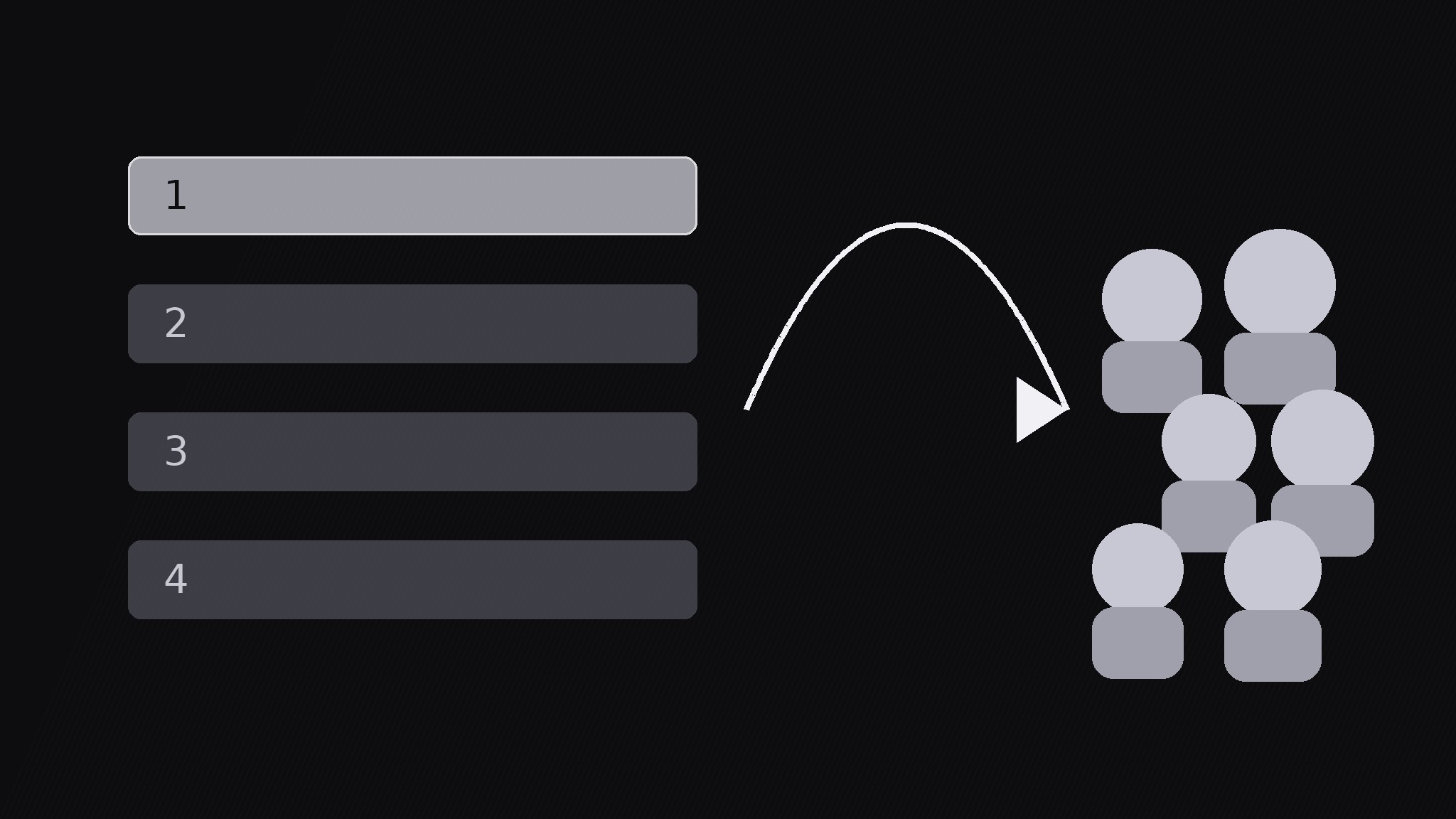
Convierte tu IA en directora de motion graphics para el patrón de lista de preguntas para el público: construye una lista breve de preguntas en pantalla y luego se la entrega al público con una llamada a responder, para que un monólogo se convierta en participación.
Instálala en 3 pasos
Sin registro. Sin herramientas CLI. Elige tu IA, copia una línea y pégala.
¿Prefieres hacerlo tú mismo? Compra la habilidad ($4.99), descarga el ZIP desde la confirmación de compra, descomprímelo en el directorio que se muestra arriba y reinicia tu sesión de IA — el mismo resultado. ¿Ya la compraste? Tu asistente de IA puede descargarla por ti.
Qué incluye
Un SKILL.md (la guía paso a paso) + una plantilla inicial. Una vista previa:
Question List to Audience
When to use
- A video that should end (or pivot) with audience answers, not just a sign-off
- A community post or lesson where the creator wants 3–5 specific questions answered in the comments
- A live or recorded Q&A setup where the audience needs to see the questions before answering them
- A survey-style segment where the questions are the content and the answers become the next video
- A classroom video where learners pause and answer the list before the lesson continues
Workflow
- Write the list (input: topic → output: 3–5 questions)
Write 3–5 questions, each max 12 words, each answerable in one sentence. Mix the types: one opinion question, one experience question, one prediction or preference question, and the rest as fits the topic. Order them easiest first — the first question should be answerable in five seconds so viewers start, not stall. If a question needs context, cut it or fold the context into the question itself; the list must stand alone when handed over. - Reveal the list progressively (input: questions → output: built list)
Reveal the list one question at a time: each row slides in from the left over 280ms with an ease-out curve, 0.5s apart, with a number badge (1, 2, 3) on each row. Hold the full list on screen for at least 2s after the last row lands so viewers can read all of it. Keep rows to one line each at ≥48px type — if a row wraps to two lines, shorten the question. Never reveal the whole list at once; a block of five questions reads as homework. - The handoff (input: built list → output: audience-facing frame)
Hand the list over with a visible gesture: the list panel slides or tilts toward the camera over 400ms, a "Your turn" header fades in above it, and the frame composition shifts from presenter-led to audience-facing (presenter shrinks or steps aside). Say the handoff out loud in one line: "Your turn — answer these." The handoff must be unmistakable: a viewer scrubbing through should be able to spot the exact frame where the video stops talking and starts asking. - The answer window (input: handoff frame → output: response moment)
Hold the handoff frame with the full list visible for 3–5s — long enough for a viewer to pick a question and start typing, or to pause the video. Show exactly how to answer: one line under the list naming the place ("Answer in the comments", "Reply to this post", "Pause and write yours down"). If the format is comments, show the comment box graphic; if it is a live session, show the countdown or queue. Do not introduce new content during the window — the list is the content now. - Harvest (input: audience answers → output: closing beat)
Close the loop: in the same video, show one or two early answers if they exist (screenshot or read-out, 3s each); in a series, open the next video by answering the best responses to the previous list. Credit the answerer by name or handle on screen. If no answers arrived yet, close with a reminder of the single easiest question rather than the whole list — one question is easier to answer than five. Never fake answers to fill this beat; an empty harvest said honestly ("no answers yet — first one gets a shout-out") beats invented ones.
Vista previa de la plantilla
Question List to Audience — Build Template
Build the list, hand it over, hold the window, harvest the answers.
The list (3–5 questions, each ≤12 words, one sentence to answer)
Standalone check: every question makes sense with no extra context: [ ]
Reveal
- One row at a time, 280ms slide-in from left, ease-out, 0.5s apart
- Number badge on each row | Row type: one line, ≥48px
- Full list hold after last row: ≥2s
Handoff (the scene change)
- List slides / tilts toward camera: 400ms
- Header fades in above list: "Your turn"
- Presenter: {shrinks / steps aside}
- Spoken handoff line: "Your turn — {answer these / pick one and answer it}."
Answer window
El paquete de la habilidad (SKILL.md + plantilla) está escrito en inglés.


