Nested Scope Emphasis
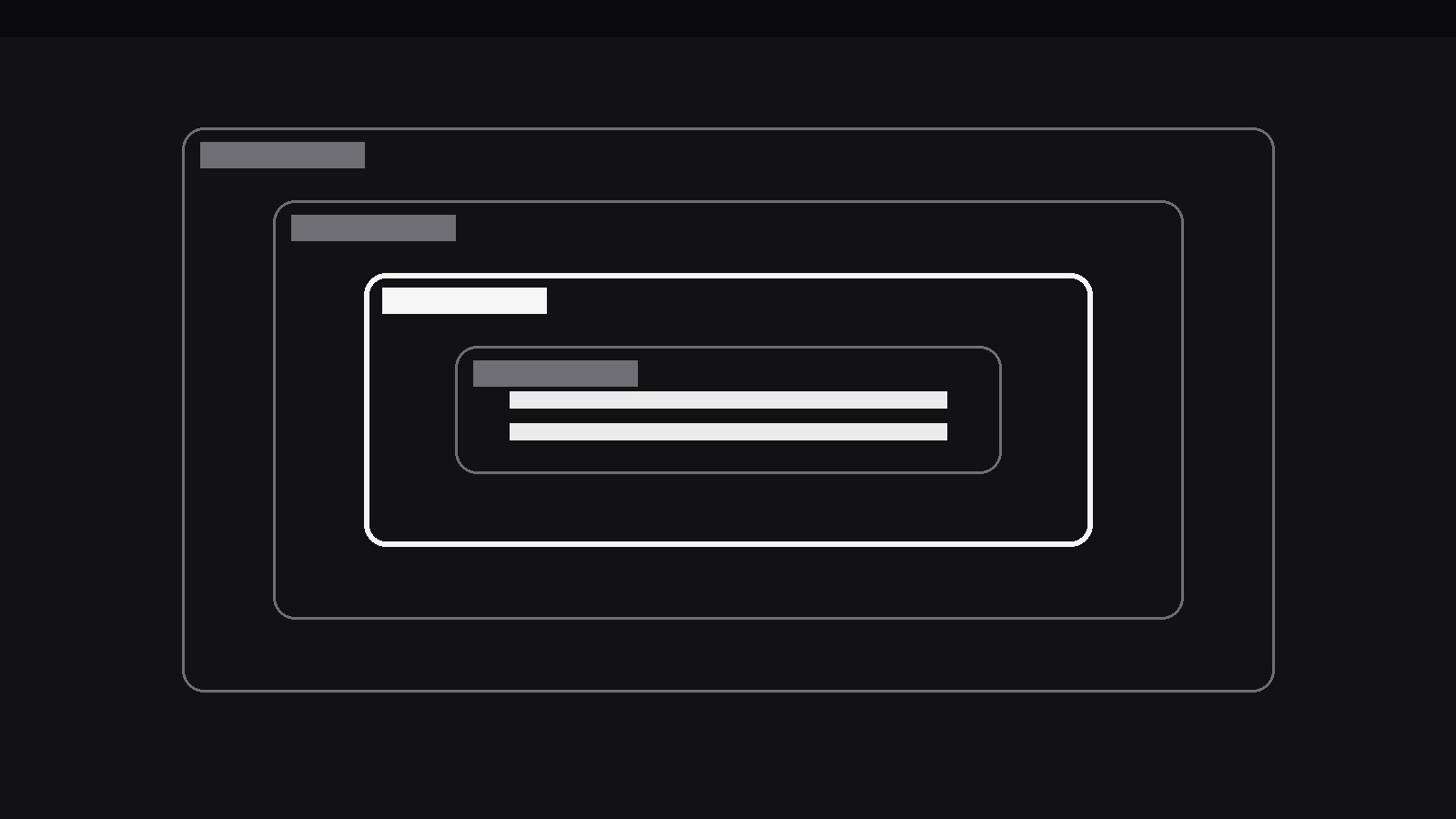
Cajas dentro de cajas: una capa se ilumina cada vez.
Convierte tu IA en diseñadora de motion graphics para un patrón concreto: una pila de ámbitos anidados (una caja dentro de una caja dentro de una caja) ilumina un nivel cada vez mientras los demás se atenúan, para que el espectador sepa exactamente de qué capa se está hablando. Para vídeos que explican código, diagramas de arquitectura y organigramas donde «¿dentro de qué?» es toda la pregunta.
Instálala en 3 pasos
Sin registro. Sin herramientas CLI. Elige tu IA, copia una línea y pégala.
¿Prefieres hacerlo tú mismo? Compra la habilidad ($4.99), descarga el ZIP desde la confirmación de compra, descomprímelo en el directorio que se muestra arriba y reinicia tu sesión de IA — el mismo resultado. ¿Ya la compraste? Tu asistente de IA puede descargarla por ti.
Qué incluye
Un SKILL.md (la guía paso a paso) + una plantilla inicial. Una vista previa:
Nested Scope Emphasis
When to use
- A code explainer walks through nested blocks (a function inside a class inside a module) and the viewer keeps losing track of which level the current line belongs to
- An architecture diagram shows systems inside systems (a service inside a cluster inside a region) and the narration needs to isolate one layer at a time
- An org chart or permissions explainer must show who sits inside which scope — team inside department inside company — without flattening the nesting
- A security or privacy explainer shows data flowing through nested boundaries (device → app → server → partner) and needs to name the boundary being crossed
- A design-system video explains tokens inside components inside layouts, where each level inherits from the one around it
- A debugging story narrows from the outer scope inward ("the bug isn't in the app, it's in the request, it's in this header") and the visual needs to narrow with it
Workflow
- Map the nesting (input: your structure → output: scope stack)
Write the scopes from outermost to innermost, each with a short name (1–3 words) and one line saying what it contains: e.g. Region → Cluster → Service → Handler. Cap the stack at 3–5 levels; a sixth level means the diagram needs restructuring, not a smaller font. Each level must genuinely contain the next — nesting that is decorative (boxes drawn inside boxes for looks) will collapse the moment the narration touches it. If two levels are really siblings, draw them side by side, not nested. The map is the contract: the animation will never show a level outside the one that contains it. - Draw the nested frame (input: scope stack → output: nesting diagram)
Draw each scope as a rounded-rectangle container with a visible border and a small label tab at its top-left corner, each inset from its parent by a consistent margin (24–32px at full size, never less than 16px, so every layer stays visible as a distinct band). The innermost scope holds the content — the code line, the component, the record — that the video is ultimately about. Use one border colour for all levels at rest (a neutral mid-grey), so that no level looks important before the emphasis arrives. Keep the labels short and always visible: a scope whose name only appears when emphasised is a scope the viewer can't navigate. - Emphasise one level at a time (input: nesting diagram → output: emphasis sequence)
The emphasis move has three coordinated parts, all within 250–350ms: the target level's border brightens to the accent colour and thickens (1.5px → 3px), its label tab fills with the accent colour, and every other level dims to 35% opacity (borders, labels, and contents alike — not just the borders). The emphasis always lands on exactly one level; there is no "emphasise two adjacent levels" state, because two lit levels reintroduce the ambiguity the pattern exists to remove. Move the emphasis between levels with a 400–600ms gap so the viewer can register each shift, and always pass through the dimmed state between levels — never cross-fade directly from one lit level to another, or the eye can't tell which level changed. - Travel inward or outward with narration (input: emphasis sequence → output: narrated journey)
The most common journey is the narrowing one: start at the outermost scope, emphasise each level in turn moving inward, and end on the innermost content. Each step gets one sentence of narration or one caption line naming the level and what it adds ("Inside the cluster, the service…"). The reverse journey — starting innermost and zooming outward — works for "why this matters" stories ("this handler runs in a service that runs in a cluster…"). Pick one direction per sequence; a journey that dives in, pops out, and dives back in reads as indecision. The content inside the innermost scope stays fully visible throughout — dimming applies to container levels, never to the payload the viewer is travelling toward. - Show a cross-boundary move (input: narrated journey → output: boundary moment)
When the story involves something crossing a boundary (a request entering a scope, data leaving one), animate that crossing explicitly: a small token (dot, packet, or line) travels from one level to the next over 400–600ms, and the boundary it crosses flashes once (a 200ms accent pulse on that level's border) at the moment of crossing. One crossing, one flash — a token that crosses three boundaries in one glide with three flashes is a firework, not an explanation. Hold the token at its destination for ≥800ms so the viewer can see where it ended up and which scope now contains it. - Resolve to the full stack (input: boundary moment → output: closing frame)
End by returning all levels to their rest state — equal neutral borders, full opacity, all labels visible — and hold for at least 1.2s, so the viewer sees the whole nesting one last time with the journey fresh in mind. If the journey ended on the innermost content, the closing frame can keep a soft, low-key emphasis on that content (a 10% accent wash, not a lit border) to mark it as the destination without breaking the "all levels equal" read. Never end mid-emphasis on a middle level: the viewer leaves unsure whether the story was about that level or the whole stack.
Vista previa de la plantilla
Nested Scope Emphasis — Starter Template
Map the nesting first. Every level must genuinely contain the next.
Scope stack (3–5 levels, outermost → innermost)
Innermost content (the payload): {e.g. The code line / component / record the video is about}
Diagram
- Container style: {rounded rectangle, label tab top-left}
- Insets: {24–32px per level, never <16px}
- Rest state: {single neutral border colour, all labels visible}
Emphasis sequence
- Journey direction (pick one): [ ] Inward (narrowing) | [ ] Outward (why it matters)
- Order: {e.g. Region → Cluster → Service → Handler}
- Emphasis: {border 3px accent + filled label tab, others dim to 35%}
El paquete de la habilidad (SKILL.md + plantilla) está escrito en inglés.


