Pipeline to Output Fan
Eines rein, vieles raus — der Fächer ist der Beweis
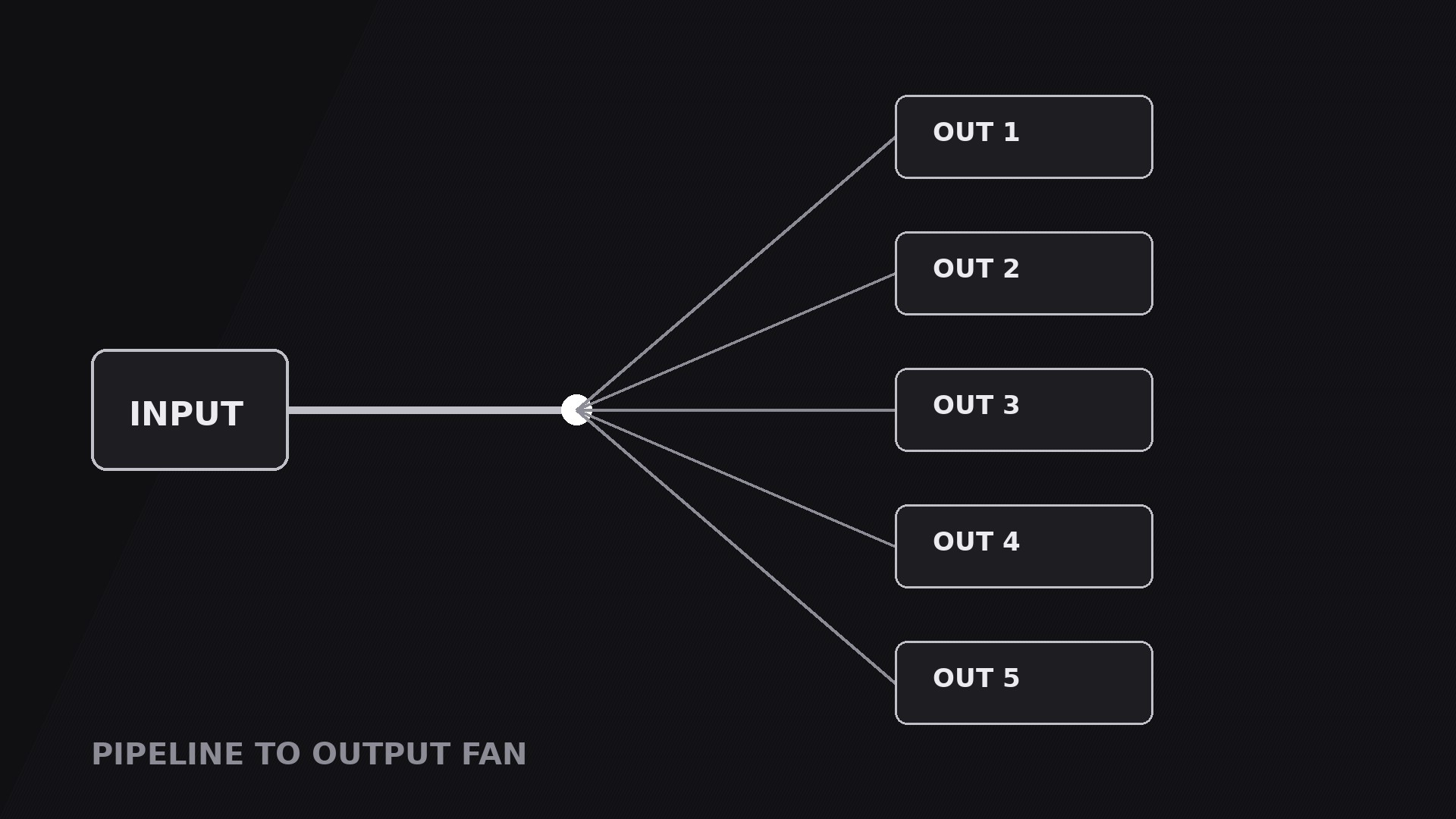
Verwandelt Ihre KI in einen Motion-Graphics-Regisseur für das Pipeline-to-Output-Fan-Muster — ein Input durchläuft eine Pipeline und fächert sich dann in viele parallele Outputs auf, sodass Zuschauer die Breite sehen: eines rein, vieles raus.
In 3 Schritten installieren
Keine Anmeldung. Keine CLI-Tools. Wählen Sie Ihre AI, kopieren Sie eine Zeile und fügen Sie sie ein.
Lieber selbst machen? Kaufen Sie den Skill ($4.99), laden Sie die ZIP-Datei aus Ihrer Kaufbestätigung herunter, entpacken Sie sie in das oben angezeigte Verzeichnis und starten Sie Ihre AI-Sitzung neu — gleiches Ergebnis. Haben Sie ihn schon gekauft? Ihr AI-Assistent kann ihn für Sie herunterladen.
Was ist enthalten
Eine SKILL.md (die Anleitung) + eine Startvorlage. Eine Vorschau:
Pipeline to Output Fan
When to use
- An explainer showing that one source feeds many channels: one video becomes clips, shorts, posts, and a newsletter
- A product demo where a single upload, prompt, or recording produces several deliverables at once
- A workflow video where the point is parallel output — the same input processed into different formats for different audiences
- A launch video showing one feature branching into many use cases, one per audience or platform
- A comparison video where one input is run through several variants side by side and the fan is the comparison itself
Workflow
- Lock the one input (input: your topic → output: a single input block)
Define exactly one thing entering the pipeline: one video file, one prompt, one dataset, one recording. Show it as a single block on the left of frame with a short label (1–3 words) and one recognisable visual — a thumbnail, a document icon, a waveform. If the story has two inputs, either merge them into one block ("Raw footage + script") or use a different pattern; a fan with two sources reads as two fans colliding. The input block is the anchor the whole shot refers back to, so make it the most solid-looking element on screen. - Define the outputs (input: input block → output: 3–6 output cards)
List the outputs the pipeline produces — three to six, never more than six, or each card shrinks past readability. Each output gets one card: a label (1–3 words), one icon or thumbnail, and one line of at most 5 words naming what it is for ("Short clip — for Reels"). The outputs must be genuinely different from each other — different formats, different channels, different audiences. If two outputs would look alike, merge them. Arrange the outputs as a vertical fan on the right of frame, spread evenly, with the middle output aligned to the pipeline's centreline. - Draw the pipeline (input: input + outputs → output: pipe geometry)
Draw one horizontal pipe from the input block to a junction point at about 60% of the frame width, then one branch line from the junction to each output card. The junction is where one becomes many — mark it with a dot or a small node so the split has a visible moment. Keep the pipe and branches as clean straight or gently curved lines of equal weight; varying line weights make the fan look accidental. The fan shape itself should read at a glance: lines spreading like ribs from one hub to many endpoints, evenly spaced, none crossing another. - Choreograph the flow and the fan (input: geometry → output: timed motion plan)
Standard timing: the input block fades in over 0.4 s and holds 0.3 s. A pulse — a bright dot or a moving highlight — travels along the pipe from input to junction over 0.6–0.9 s (ease-in-out), arriving at the junction with a 0.15 s node pop. Then the branches draw outward from the junction to the output cards, staggered 0.08–0.12 s apart, each 0.3–0.4 s, ease-out. The output cards pop in at the end of their branch, one at a time in top-to-bottom order, each with a 0.15 s scale overshoot. Total fan-out move: 0.8–1.2 s. The sequence must read as cause then effect: flow first, fan second, cards last. - Hold the fan and guide the eye (input: finished fan → output: hold-and-guide plan)
Hold the completed fan for 2.5–4 s — this is a reading shot. During the hold, guide the eye with a single moving highlight: a brightness lift or a thin outline travelling down the output cards in order, ~0.6 s per card, while the voiceover names each one. Never highlight two cards at once. If the voiceover discusses only two or three outputs in detail, highlight only those; the rest stay visible but unlit. Keep the input block visible throughout — it is the reason the outputs belong together. - Exit cleanly (input: held fan → output: exit plan)
Exit by either fading the fan out as a whole while the input block stays for the next shot, or collapsing the branches back into the junction (reverse of the fan-out, 0.4 s) and continuing down the pipeline. The collapse-back exit works when the next shot follows one output in detail — collapse, then expand that one card to full frame. Render a draft and check three things: no branch lines cross, every card is legible on a phone screen, and the pulse visibly arrives at the junction before any branch draws — if a branch draws early, the cause-and-effect reads backwards.
Vorschau der Startvorlage
Pipeline to Output Fan — Starter Template
One input in, many outputs out. Define the input first, then the fan.
The input
Input (one thing only): {one video / one prompt / one dataset / one recording}
Input label (1–3 words): {label}
Input visual: {thumbnail / document icon / waveform}
Voiceover line: "Start with {input} — and it fans out into {number} outputs."
The outputs (3–6, genuinely different)
Cut check: if two outputs differ only in name, merge them. Difference must be visible at a glance.
Order: {top-to-bottom in voiceover order / ranked biggest first}
Motion plan
Geometry check
Das Skill-Paket selbst (SKILL.md + Vorlage) ist auf Englisch verfasst.


