Icon Distribution Sweep
Ein Schwung Icons sortiert sich an seinen Platz — Verteilung, der Sie beim Geschehen zusehen können.
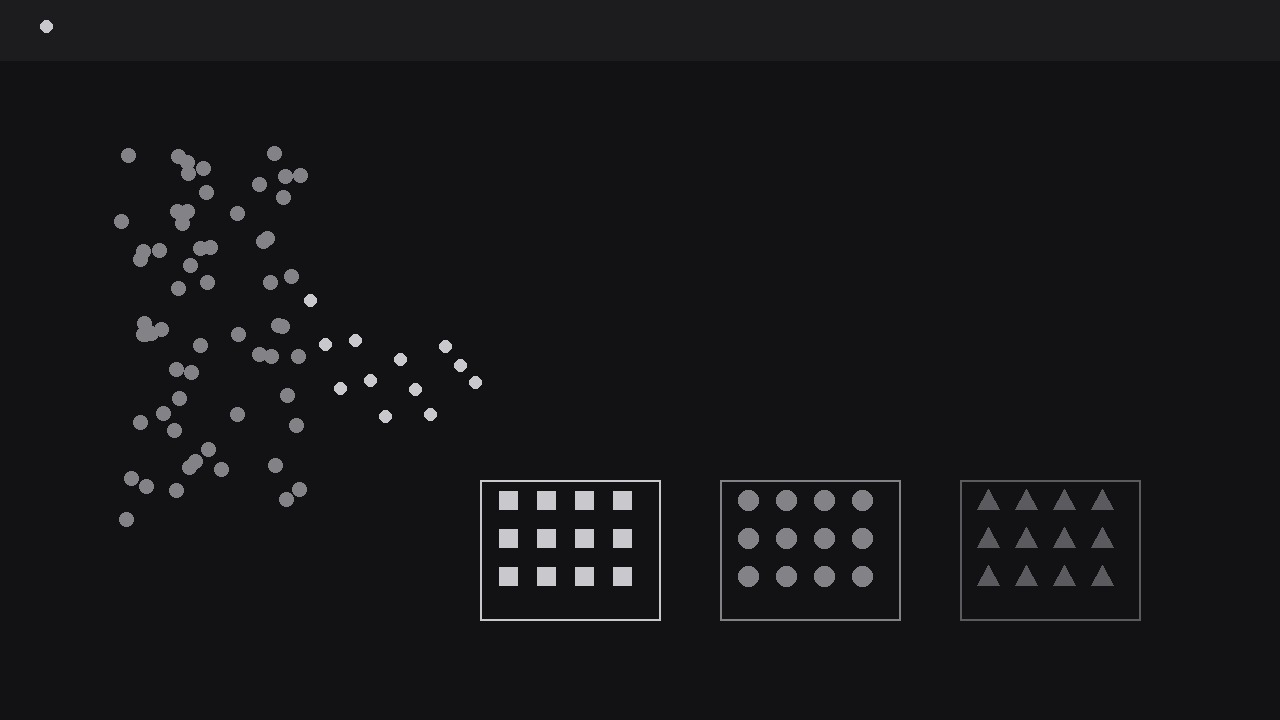
Verwandelt Ihre KI in einen Motion-Graphics-Regisseur für Verteilungs-Sweeps — nimmt eine Wolke aus Icons, fegt sie über das Bild und sortiert sie sichtbar in ihre Gruppen oder Behälter, damit Ihr Publikum eine Verteilung geschehen sieht, statt nur davon zu hören. Für Explainer über Sortieren, Zuteilen, Umfrageergebnisse und jede Aufteilung, die man sehen muss, um sie zu glauben.
In 3 Schritten installieren
Keine Anmeldung. Keine CLI-Tools. Wählen Sie Ihre AI, kopieren Sie eine Zeile und fügen Sie sie ein.
Lieber selbst machen? Kaufen Sie den Skill ($4.99), laden Sie die ZIP-Datei aus Ihrer Kaufbestätigung herunter, entpacken Sie sie in das oben angezeigte Verzeichnis und starten Sie Ihre AI-Sitzung neu — gleiches Ergebnis. Haben Sie ihn schon gekauft? Ihr AI-Assistent kann ihn für Sie herunterladen.
Was ist enthalten
Eine SKILL.md (die Anleitung) + eine Startvorlage. Eine Vorschau:
Icon Distribution Sweep
When to use
- A results video needs to show how a hundred survey responses, votes, or items split across a few categories — and the split itself is the story
- An onboarding or process explainer shows incoming items being sorted into teams, queues, or destinations
- A budget, inventory, or allocation video divides one pool into portions and the audience must feel the proportions, not just read percentages
- A classroom or training clip demonstrates a classification rule: every item gets judged and lands in exactly one bucket
- A social clip needs a satisfying sorting moment — a messy pile resolving into neat groups — as the hook before the explanation
Workflow
- Define the pile and the bins (input: items and categories → output: pile-and-bins map)
Start with two lists: the pile (what is being distributed) and the bins (where it lands). The pile must be countable things of one kind — responses, orders, tickets, files — each represented by one identical icon. The bins are two to five categories, each with a name of one or two words and a destination zone on screen. Cap the total icons at 100: at that count each icon is still individually visible, and the pile still reads as "many". Beyond 100, switch to icon-units (one icon = ten items) and say so on screen — pretending 1,000 icons are individually countable is dishonest and unreadable. For each bin, write its share as a count, not just a percentage ("42 of 100 go to Support"), because the animation will show counts, and the script must match the animation exactly. If an item could belong to two bins, fix the rule before animating: a distribution where items hesitate between bins reads as a broken sort. - Stage the pile and the bins (input: pile-and-bins map → output: staged frame)
Lay out the frame in two zones: the pile zone (a loose cloud or stack on one side, icons slightly overlapping, gently jittered so it reads as unsorted) and the bin zones (a row along the bottom, or a row of columns, each with a clear label and an empty receiving area). Bins get equal-sized zones regardless of their eventual share — sizing bins by outcome prejudges the result and makes small bins look like afterthoughts. Give each bin a distinct marker: a different icon shape, a different shade, or a small header glyph, so a colour-blind viewer can still tell the bins apart by form. The pile's icons all start in one shared style; they take on their bin's marker only when they land, which makes the sorting visible as a transformation, not just a relocation. Leave clear travel lanes between the pile and the bins — no labels, captions, or decorations crossing the sweep path. - Run the sweep (input: staged frame → output: icons in motion)
The sweep is one continuous gesture: icons stream from the pile toward their bins in a loose flow, not in rigid single file. Release icons in small batches of three to five every 120–180 ms, with each icon's path slightly varied (a few pixels of lateral wobble) so the flow reads as organic rather than mechanical. Travel time is 500–750 ms per icon with an ease-in-out curve — fast enough to feel like a sweep, slow enough that the eye can follow one icon if it tries. Crucially, icons must visibly commit to a destination mid-flight: by the halfway point, each icon's path should clearly bend toward its bin, so the audience can predict where it will land and feel the sort happening. Do not move all icons at once — a single simultaneous burst reads as a teleport, and the distribution registers as a before/after, not a process. The pile should visibly shrink as the sweep runs, which sells the conservation: nothing appears or disappears, everything moves. - Land and stack the icons (input: icons in flight → output: sorted bins)
As each icon arrives, it settles into its bin's receiving area in a tidy formation — a grid, a row stack, or a fill-from-the-bottom bar of icons. The formation must be orderly: sorted results look sorted, and a jumbled bin undermines the whole pattern. Each landing gets a tiny settle: a 60 ms scale pulse to 105% and back, or a soft click of opacity, just enough to register the arrival without flashing. Icons take on their bin's marker at the moment of landing — the shape or shade change happens on arrival, not in flight, so the transformation reads as "judged and placed". When a bin fills a row, the next row starts above or beside it with a 4–6 px gap, and the bin's running count ticks up in its header ("Support · 23") in sync with the landings. The sweep ends only when the pile zone is empty: a single leftover icon reads as a mistake, not a stylistic choice. - Reveal the proportions (input: sorted bins → output: bins with readable proportions)
Once every icon has landed, hold the sorted frame for a full second, then reveal the proportions: the count in each bin header is already there; now add the percentage beside it, or a thin proportional bar under each bin that grows to its share. The proportion reveal must match what the audience just watched — if the biggest bin does not look biggest, the sort staging was wrong, and no label will fix it. Highlight the takeaway with one comparison beat: the largest bin's header brightens, or a bracket spans the two bins being compared with their difference ("Support 42 vs. Sales 18"). Then hold the finished distribution for at least two seconds — the audience needs time to scan all bins and confirm the picture. If the video continues into explanation, keep the sorted bins visible in the background at reduced opacity rather than cutting away; the distribution is the evidence the explanation refers to. - Verify counts and readability (input: finished sweep → output: verified export)
Count the icons in each bin in the final frame and check them against the source numbers — animation tools drift, and a bin that shows 41 icons for a count of 42 is a visible error to anyone who pauses. Watch muted at 1x speed: can you follow one icon from pile to bin, and does the final distribution match the stated proportions at a glance? At phone scale, check that individual icons are still distinguishable (minimum 12 px) and bin labels legible. If the sweep feels too fast to follow, slow the batch rate rather than the travel time — spacing the batches preserves the sweep's energy while giving the eye time to track. Do not loop the sweep: a loop that refills the pile makes the distribution look reversible and arbitrary. End on the held, sorted frame.
Vorschau der Startvorlage
Icon Distribution Sweep — Starter Template
One pile, visible sorting, counts that match the source exactly.
What is being distributed (one sentence)
{Example: "100 survey responses split across four support teams."}
Pile
One icon kind: {e.g. identical dot / ticket glyph} | Total icons: {≤100, or 1 icon = {n} items} Source of counts: {where the numbers came from — the animation must match it}
Bins (2–5, equal-sized zones)
Total check: {sum of bin counts} = {pile total} ☐
Staging
- Pile zone: {one side, loose jittered cloud} | Bin zones: {row along bottom / column}
- Travel lanes: {clear of labels and decorations}
Das Skill-Paket selbst (SKILL.md + Vorlage) ist auf Englisch verfasst.


