Education Explainer Kit
Ein Konzept pro Video, so gelehrt, dass es hängen bleibt.
Verwandelt Ihre KI in einen Builder für Explainer-Video-Kits — plant ein Lehr-Kit rund um ein Konzept pro Video, fügt die Skills zusammen, die es braucht (Konzept-Skript, visuelle Metapher, durchgerechnetes Beispiel, Fehlverständnis-Check), und setzt die Latte, die jeder überspringen muss, damit Zuschauer wirklich lernen, statt nur zu schauen.
In 3 Schritten installieren
Keine Anmeldung. Keine CLI-Tools. Wählen Sie Ihre AI, kopieren Sie eine Zeile und fügen Sie sie ein.
Lieber selbst machen? Kaufen Sie den Skill ($4.99), laden Sie die ZIP-Datei aus Ihrer Kaufbestätigung herunter, entpacken Sie sie in das oben angezeigte Verzeichnis und starten Sie Ihre AI-Sitzung neu — gleiches Ergebnis. Haben Sie ihn schon gekauft? Ihr AI-Assistent kann ihn für Sie herunterladen.
Was ist enthalten
Eine SKILL.md (die Anleitung) + eine Startvorlage. Eine Vorschau:
Education Explainer Kit
When to use
- You teach something (a product, a process, a school topic) and your videos get views but viewers still ask the same questions afterward
- Your explainers cram three ideas into one video and viewers drop off halfway
- You want a repeatable way to turn any topic into a teaching video, not a fresh invention each time
- Your videos look polished but nobody can say what the viewer should be able to do after watching
- You keep re-explaining the same concept because the first video never landed
Workflow
- Scope the kit (input: your topics and audience → output: kit scope sheet)
Define the audience's starting knowledge in one paragraph — what they already know, what vocabulary they already have, what they are trying to do with this knowledge. Then set the kit's iron rule: one concept per video, stated as a single sentence the viewer should be able to repeat afterward ("After this video, the viewer can explain why a loan's monthly payment barely dents the balance in year one"). Every skill in the kit serves that one sentence. A kit that allows two concepts per video is a kit that teaches neither. - Inventory the teaching skills (input: scope sheet → output: skill inventory)
List the skills the kit needs, one per teaching job: Concept script (turns the one-concept sentence into a spoken script with a hook, a plain-language definition, and a recap), Visual metaphor (turns the abstract part of the concept into one concrete analogy with a matching visual brief), Worked example (turns the concept into a step-by-step example the viewer can follow with a pencil), Misconception check (turns the concept's common wrong turns into on-screen corrections and a self-test question), Production pack (turns script + visuals + example into a shot list, narration cues, and on-screen text). If the kit has no misconception skill, viewers will leave with the same wrong idea they arrived with — just more confidently held. - Write the contract for each skill (input: skill inventory → output: per-skill input/output contracts)
For every skill, write the input, the output, and the pass bar. The pass bars are teaching bars, not production bars: Concept script — "a viewer with the stated starting knowledge can paraphrase the concept after one watch, no jargon left undefined"; Visual metaphor — "one analogy, carried through the whole video, never mixed with a second"; Worked example — "every step shown, no step skipped with 'and then you just…', viewer can redo it alone"; Misconception check — "names the two most common wrong answers and shows why each fails." A beautiful video that fails these bars is a failed lesson with nice lighting. - Build the composition order (input: contracts → output: kit playbook + template pack)
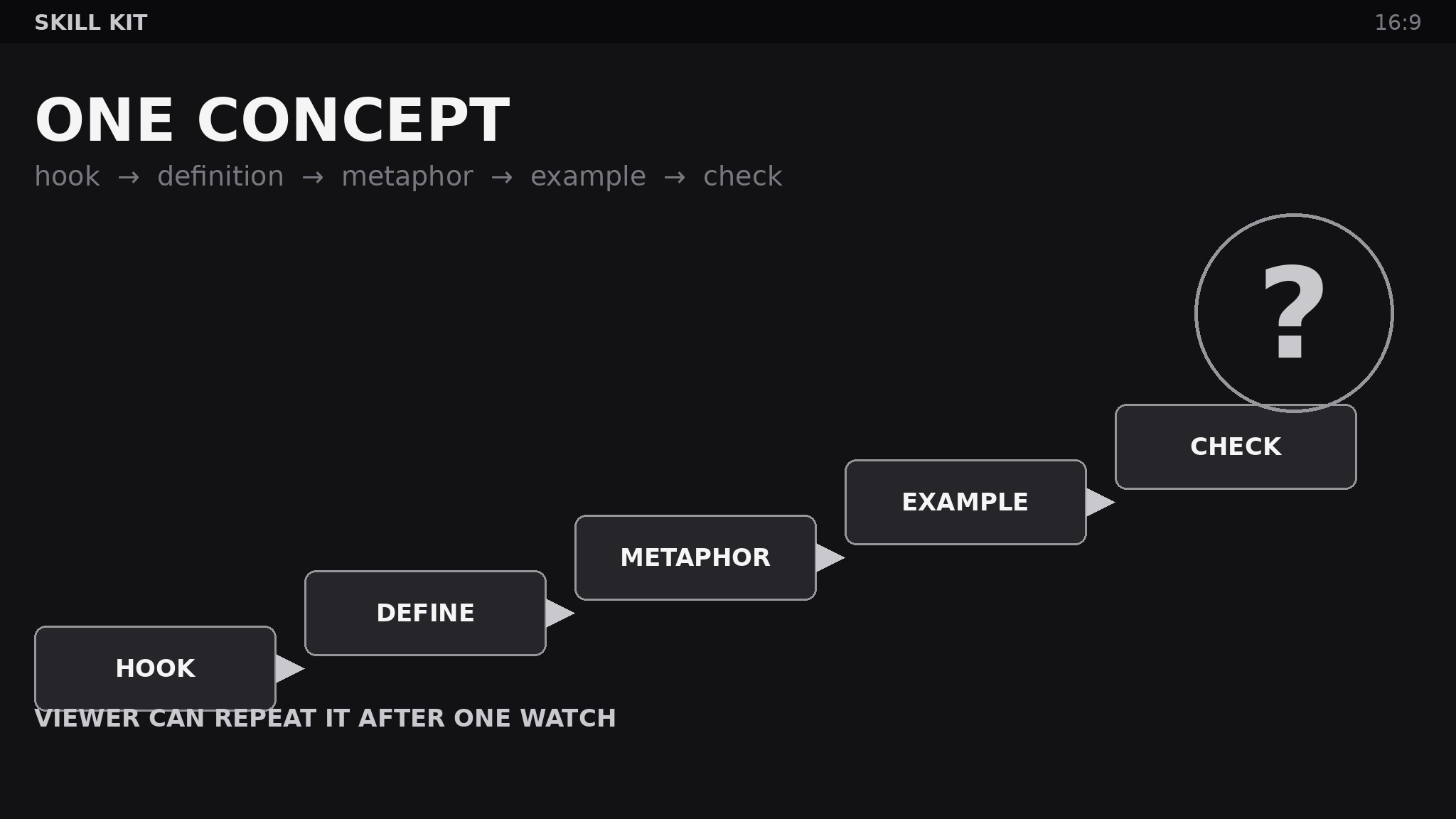
Fix the order the skills compose into a video: hook (why this matters, 15 seconds) → plain definition → visual metaphor → worked example → misconception check → recap in the viewer's own words → self-test question. Provide templates: script skeleton with timing marks, metaphor brief (analogy, what maps to what, where it breaks down), example worksheet, check-question bank. The composition order is the pedagogy — changing it (example before definition, recap skipped) changes what viewers retain, so it is not optional. - Test on one real viewer and harden (input: playbook → output: hardened kit + fixes log)
Show the first video built with the kit to one person from the actual audience, then ask them to explain the concept back and redo the worked example alone. Where they stumble is where the kit failed — log it, fix the responsible skill's contract or template, and re-test. A kit validated against a real viewer beats a kit reviewed by its own author. Re-test after every third video; audiences drift, and the scope sheet's starting-knowledge paragraph goes stale.
Vorschau der Startvorlage
Education Explainer Kit — Video Pack
One concept per video. If this template needs a second "viewer can…" sentence, it needs a second video.
1. Kit scope sheet
Audience starting knowledge: {what they already know, vocabulary they have, what they want to do with it} One-concept sentence: After this video, the viewer can {explain / do / decide} {concept}. Video length target: {minutes}
2. Concept script skeleton
Hook (≤15 sec): {why this matters, in the viewer's words} Plain-language definition: {concept in one paragraph, no jargon left undefined} Recap (viewer repeats it): {the concept restated as the viewer would say it}
Das Skill-Paket selbst (SKILL.md + Vorlage) ist auf Englisch verfasst.


