Capacity with Anchored Callouts
Schwellen-Labels poppen exakt dann auf, wenn der Balken sie passiert.
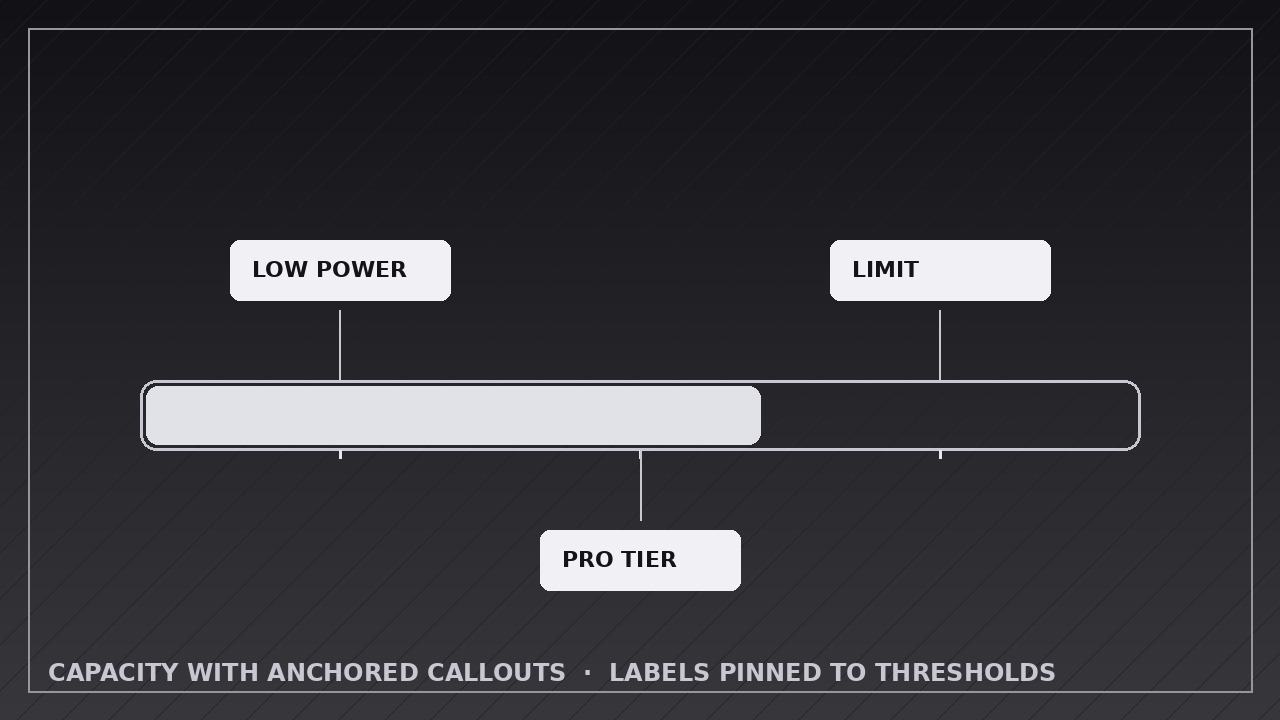
Bringt Ihrer KI bei, eine Kapazitätsanzeige mit festen Schwellenstrichen zu bauen, bei der jedes Callout genau in dem Moment an seiner Marke verankert aufpoppt, in dem die Füllung sie erreicht — und für das final annotierte Bild stehen bleibt.
In 3 Schritten installieren
Keine Anmeldung. Keine CLI-Tools. Wählen Sie Ihre AI, kopieren Sie eine Zeile und fügen Sie sie ein.
Lieber selbst machen? Kaufen Sie den Skill ($4.99), laden Sie die ZIP-Datei aus Ihrer Kaufbestätigung herunter, entpacken Sie sie in das oben angezeigte Verzeichnis und starten Sie Ihre AI-Sitzung neu — gleiches Ergebnis. Haben Sie ihn schon gekauft? Ihr AI-Assistent kann ihn für Sie herunterladen.
Was ist enthalten
Eine SKILL.md (die Anleitung) + eine Startvorlage. Eine Vorschau:
Capacity with Anchored Callouts
When to use
- Explaining pricing or quota tiers: free up to X, pro up to Y, enterprise beyond Z, with each threshold labeled on the bar
- Showing a battery, storage, or budget meter where specific levels mean something ("low power mode at 20%")
- Walking through fundraising, campaign, or project progress with milestone markers along the way
- Teaching safe operating ranges: green zone, warning zone, danger zone, each anchored to its threshold
- Visualizing a journey with checkpoints: each threshold crossed unlocks a label or reward
- Comparing "where we are" against "where the thresholds sit" in a single glance
Workflow
- Define the thresholds (input: your scenario → output: threshold list with value, label, and meaning)
List every threshold in ascending order: its exact value (e.g. 20%, 50 GB, $10k), a short label of 1–4 words ("Low power", "Pro tier", "Stretch goal"), and one line on what happens at that threshold. Cap the list at 5 thresholds — more than that and the callouts crowd each other. Space check: at the final render size, adjacent threshold labels must not overlap when all are visible; if they do, merge or cut thresholds before animating. - Build the meter with anchor marks (input: threshold list → output: meter with fixed threshold ticks)
Build the bar with every threshold marked from the start: a tick line, a small dot or notch on the bar, and a faint value label. These anchor marks are static — they are the map the viewer reads before the bar moves. The bar's container, scale, and anchor marks never move during the animation; only the fill and the callouts animate. Hold this empty-but-marked state for 1 second so the viewer can read the map. - Fill toward the first threshold (input: marked meter → output: fill keyframes to threshold one)
Animate the fill from 0 to the first threshold over 1.0–1.5 seconds, ease-in-out, with a numeric readout tracking the fill exactly. The fill stops precisely at the threshold tick — not past it, not short of it. A fill that overshoots its threshold and slides back reads as a bug, so land on the tick. - Pop the callout as the bar passes each threshold (input: fill reaching a threshold → output: callout pop keyframes)
The moment the fill touches a threshold, pop its callout: scale from 0.8 to 1.0 with a fade over 0.3–0.4 seconds, ease-out, with a small overshoot (the callout settles, not snaps). The callout is anchored to its threshold tick by a leader line or stem — the anchor line is drawn first (0.15 s), then the callout body pops at the end of the line. The callout stays visible for the rest of the animation; it never fades out to make room for the next one. After each pop, hold 0.5 seconds so the viewer reads the label before the fill resumes. - Continue through all thresholds (input: first callout → output: fill + pop sequence for remaining thresholds)
Repeat the same rhythm for every threshold: fill to the tick (0.8–1.2 s between thresholds), pop the anchored callout (0.3–0.4 s), hold 0.5 s. Keep the rhythm identical for every threshold — same fill easing, same pop timing, same hold — so the viewer learns the pattern after the first threshold and can anticipate the rest. If a threshold is the "current value" (where the bar stops), give it one extra emphasis: a slightly larger callout or a persistent highlight, applied once. - End on the full annotated meter, then export (input: complete sequence → output: rendered video)
When the fill reaches its final value, hold the fully annotated meter — bar, all callouts, readout — for 2–3 seconds so it can be studied or screenshotted. Export at the platform's native size (1920×1080 for YouTube, 1080×1080 or 1080×1920 for social), 30 fps, H.264. Verify: every callout's leader line points at exactly its threshold tick, no two callouts overlap, and the fill never covers a callout's text.
Vorschau der Startvorlage
Capacity with Anchored Callouts — Animation Spec Template
Fill in the thresholds before animating. Ticks are visible from the start; callouts pop only as the fill touches each tick.
Meter: {what it measures — e.g. storage used, funding progress, budget spent}
Canvas: {1920×1080 / 1080×1080 / 1080×1920} | Frame rate: 30 fps | Export: H.264 Meter shape: {horizontal bar / vertical gauge} Final fill value: {value + unit — where the bar stops} Max thresholds: 5 | Callout placement: {all above / all below / alternating above-below}
Thresholds (ascending order)
Das Skill-Paket selbst (SKILL.md + Vorlage) ist auf Englisch verfasst.


